


Service Pages
Core offerings directly linked from nav

Your agency just delivered the SEO Checklist for New Websites in 2026. Design looks great. Now what?
The answer: SEO starting from day one. Most websites go live with technical gaps that silently suppress rankings for months. This 30-point checklist covers everything you need to implement immediately after launch and what you maintain on a recurring schedule thereafter.
This 2026 edition includes AEO (Answer Engine Optimization) for AI search, GEO (Generative Engine Optimization), and updated Core Web Vitals benchmarks. These are no longer advanced topics; they are table stakes for any site that wants to rank and be cited by AI systems.
Full Technical SEO Checklist: The 2026 Guide is the foundation that determines whether everything else can rank. Fix technical issues before writing a single piece of content.
GSC shows exactly how Google sees your site: which pages are indexed, which queries trigger your content, and what errors have been found.
Bing powers ChatGPT search and has 100M+ daily users. Ten minutes to set up and provides a second crawl dataset worth having.
GA4 measures where traffic comes from, which pages perform, and whether visitors convert. Without it, you cannot measure SEO results.
The robots.txt file tells crawlers which pages to access and which to skip. A misconfigured file can accidentally block your entire site as one of the most common and most costly launch mistakes.
A sitemap lists all pages you want indexed and tells Google how they relate to each other. Include all public pages; set priority values (1.0 for the homepage, 0.8 for key service pages, and 0.6 for blog posts); and exclude thank-you pages, duplicate content, and noindexed URLs. Submit both in GSC and Bing Webmaster Tools.
SSL is a confirmed Google ranking signal. Any site launching without it is at a disadvantage before a keyword is targeted.
404 errors on a new site usually appear because a developer linked to a URL that was renamed, moved, or never created. They waste crawl budget and damage user experience.
Canonical tags tell Google which version of a page is the official one. Without them, duplicate URL variants compete against each other and split ranking power.
How your site is structured determines how efficiently Google crawls it and how clearly it understands your topical authority.
You can use the following for reference to create a keyword-rich URL structure:
Every important page should be reachable within 3 clicks from the homepage. Pages buried deeper receive less crawl budget and rank less effectively.
You can implement site structure in accordance with the following example:
Level 1: Homepage
Level 2: Service pages and main categories (1 click from home)
Level 3: Sub-services, blog categories, landing pages (2 clicks)
Level 4: Individual posts and detailed pages (3 clicks maximum)
Every level 4 page should have strong internal links from level 2 and 3 pages
Core Web Vitals are Google's official user experience metrics and a confirmed ranking signal. There are three metrics that matter in 2026.
Updated SEO Checklist for 2026: Mastering On-Page Basics is about making each individual page as clear and relevant as possible for its target query. These optimizations apply to every page before it goes live.
Internal linking rules: every new article should link to 2-3 existing pages, including service pages. Every service page should link to supporting blog content. Use descriptive anchor text, never 'click here’. 'Build topic clusters: one pillar page supported by multiple interlinked articles.
External linking rules: link statistics to primary sources (Google, Statista, peer-reviewed research). Set external links to open in a new tab. Add rel=nofollow to paid links and affiliate links.
Schema tells search engines the specific meaning of your content, enables rich results in Google, and helps AI systems extract structured information about your brand.
Content SEO is the strategy of what to write, how often, and how to structure it for topical authority. A single article does not build authority, a cluster of interconnected articles does.
You can create content cluster structure like the one below:
Pillar page: The comprehensive guide on a broad topic (e.g. Complete SEO Guide for New Websites)
Cluster page 1: Deep-dive into a sub-topic (e.g. Technical SEO Checklist)
Cluster page 2: Another sub-topic (e.g. On-Page SEO Checklist)
Cluster page 3: Another sub-topic (e.g. Core Web Vitals Guide)
All cluster pages link back to the pillar; the pillar links out to all cluster pages
Off-page signals that are primarily backlinks and brand mentions, tell Google that other websites trust yours. They are the most competitive SEO dimension because they cannot be manufactured instantly.
In order to create high quality backlinks, consider the following table:
In order to main your social mediapresence, you can follow the table below:
Essential for any business serving customers in specific geographic areas. Local SEO determines whether you appear in Google Maps, the local pack, and "near me" searches.
E-E-A-T: Experience, Expertise, Authoritativeness, and Trustworthiness are how Google quality raters assess whether content deserves to rank. No technical fix compensates for absent E-E-A-T signals.
E-E-A-T is essential for SEO and AEO because it helps search engines and AI platforms identify trustworthy, expert-led content. Experience is shown through real examples and results. Expertise comes from qualified authors and deep topical coverage.
Authoritativeness is built through backlinks, mentions, and industry recognition. Trustworthiness comes from transparency, security, and credible sourcing. Together, these signals strengthen rankings, improve AI visibility, and build topical authority.
Google AI Overviews now appear for an estimated 30 to 40 percent of queries. ChatGPT Search and Perplexity are growing rapidly. New websites built with SEO 2026 Checklist: Staying visible in the age of AI Search in mind from day one has a structural advantage.
SEO is not a launch task as it is a recurring system. The sites that rank consistently are the ones with a structured monitoring routine, not the ones that optimize once and move on.
The Webflow App Marketplace now hosts over 300 vetted apps. That is a lot of noise to cut through, especially when you are trying to build a fast, well-optimized, high-converting website and do not have hours to test every option.
In this guide, we have done that work for you. We have grouped the best Webflow plugins by category so you can find what you need quickly, understand what each tool actually does, and make an informed decision about what to install.
Important distinction: Webflow calls them 'apps,' not plugins. But '10 Best Webflow Plugins & Extensions for 2026' is what most people search for, so we use both terms interchangeably throughout this Webflow Plugins Guide: Best Free & Paid Add-Ons. Webflow's team vets apps installed via the Webflow App Marketplace. Third-party integrations connected via embed code are not; use those with care.
Before diving into the plugins themselves, here is how to install them, as the process differs by type.
1. Open your Webflow project and click the Apps icon in the left sidebar of the Designer
2. Browse or search the Webflow App Marketplace for the tool you want
3. Click 'Add to Site' and follow the authorisation prompts
4. Configure settings inside the app panel; no code required for most tools
5. Test on a staging domain before publishing to your live site
1. Get your embed code snippet from the plugin provider's documentation
2. In Webflow, go to Project Settings → Custom Code for site-wide scripts
3. Paste the script in the <head> or before </body> as specified in the docs
4. For page-specific scripts, use the page's Page Settings → Custom Code section
5. For element-level widgets, drag an Embed element onto the canvas and paste the code inside it
6. Always publish and test in multiple browsers; preview mode does not run custom code
Below is the comprehensive, category-by-category Webflow Plugins Guide covering the best free and paid add-ons for SEO, CMS filtering, memberships, animations, analytics, automation, localization, forms, design assets, and content. Every plugin is reviewed with expert verdicts, real-world use cases, pros & cons, and up-to-date 2026 pricing.
Webflow's native SEO controls are a solid foundation, but these plugins extend them with on-page auditing, AI-powered metadata generation, keyword guidance, and structured data management at scale, essential for any Webflow site serious about organic search visibility.
Real-time on-page SEO auditing inside the Webflow Designer
Semflow is the closest thing Webflow has to a native SEO suite. It runs live audits as you build, flagging missing metadata, broken heading hierarchies, and poor alt text in real time. Its AI generates optimized meta titles and descriptions per page, while a keyword density checker and content health score keep your CMS items performing. No external dashboards, no context switching: everything lives inside the Webflow Designer, where you actually work.
Best free SEO app in the Webflow App Marketplace
AI SEO Copilot is the most-installed free SEO tool in the Webflow Marketplace for good reason. It runs automated audits across your entire site, checking for missing metadata, broken heading structures, and images lacking alt text, then surfaces clear, actionable fixes. It works across static pages and CMS collection templates alike, making it an excellent starting point for freelancers and teams with limited SEO budgets who still want a competitive baseline.
Webflow's native CMS is excellent for content management but ships without front-end filtering or real-time search. These tools close that gap, non-negotiable for blogs, job boards, directories, and product catalogs that need dynamic, user-driven content navigation.
No-code real-time CMS search, filtering, and favoriting
Jetboost turns Webflow's static CMS into a fully interactive, filterable data layer without writing a single line of JavaScript. Using its no-code visual editor, you can configure real-time search, multi-criteria filtering, and CMS item favoriting in minutes. It handles infinite scroll, load-more patterns, and pagination natively and pairs seamlessly with Memberstack to track logged-in user preferences. The go-to plugin for job boards, resource hubs, and directories on Webflow.
Gold standard for advanced CMS logic and conditional rendering
Finsweet Attributes is the most powerful and widely trusted free library in the entire Webflow ecosystem. It works through a declarative attribute system. You add custom data attributes to your Webflow elements to unlock advanced CMS filtering, dynamic rendering, and conditional logic with no custom JavaScript. Its CMS Combine feature famously breaks Webflow's 100-item collection limit. Backed by Finsweet, a premier Webflow partner since 2017, with extensive documentation and a highly active community.
Webflow's native membership features are a solid starting point, but for advanced user authentication, gated content at scale, subscription billing, or custom member portals, these plugins go significantly further with less backend complexity.
Memberstack transforms your Webflow site into a fully gated, membership-powered platform without writing a single line of backend code. It handles user authentication across email, Google, Facebook, LinkedIn, GitHub, and Spotify, plus built-in Stripe integration for subscriptions and one-time payments. Used at scale by American Airlines and Entrepreneur.com, it pairs seamlessly with Jetboost and Outseta, making it the most complete membership solution in the Webflow ecosystem for 2026.
Webflow's native interactions are powerful, but these tools extend your capabilities further, from lightweight vector animations that load in kilobytes to full component libraries that reduce build time by up to 50%.
Lightweight vector animations with scroll, hover, and triggers.
LottieFiles brings broadcast-quality vector animations to Webflow without any performance penalty. Most LottieFiles weigh just a few kilobytes compared to video equivalents that run in megabytes. With a library of 50,000+ ready-made animations and support for scroll, hover, and click event triggers inside Webflow, it's the fastest way to add motion to your UI. Teams can also export directly from After Effects via the official LottieFiles plugin, creating a clean handoff workflow from animation to production.
1,000+ pre-built Webflow components + AI site generator
Relume is the design system that topWebflow agencies rely on to build faster without sacrificing quality. Its library of 1,000+ accessible, brand-consistent components follows Webflow's own best practices, meaning clean, maintainable code every time. The standout feature is its AI site generator: paste in a brief, and it produces a full sitemap and wireframe in minutes. Teams consistently report 30-50% reductions in design and development time on standard builds when using Relume.
Serving multiple language markets requires more than translation, as it demands proper hreflang tags, separate translated URLs, and an organized workflow for managing copy across teams. These two plugins cover opposite ends of the scale.
Automatic translation with manual override and hreflang support.
Weglot is the fastest route to a multilingual Webflow site that ranks in search. It automatically translates your content across 110+ languages, creates dedicated translated URLs for each locale, and generates native hreflang tags that give Google the signals it needs to serve the right language to the right user. Every string is editable via a clean override interface, so your team can refine machine translations for brand accuracy. Integrates directly with Webflow without disrupting the designer.
Enterprise translation management with automated content syncing
Lokalise is built for organizations running dedicated translation workflows across multiple content markets at scale. It syncs multilingual content automatically based on the user's detected location with no manual deployment steps required and provides enterprise-grade translation management with team collaboration, review workflows, and version control. A 14-day free trial is included on all plans. The 10-seat minimum makes it overkill for solo builders, but for larger teams it's the most robust Webflow localization option available.
Understanding how users interact with your Webflow site requires both quantitative data and qualitative insight. These tools cover the full spectrum from Webflow-native engagement tracking to visual session recordings that reveal exactly where users drop off.
Click tracking, CMS engagement analytics, and logged-in behavior
Nocodelytics fills a gap that Google Analytics doesn't; however, it tracks Webflow-specific interactions like CMS item clicks, search queries, and user journey patterns without any custom code. Its integration with Jetboost and Memberstack lets you track behavior for logged-in users, giving membership sites insight that generic analytics tools simply can't provide. Visual charts surface your most popular content and navigation paths, and it works across unlimited websites that are ideal for agencies managing multiple client sites.
Session recordings and heatmaps for visual user behaviouranalysis
Session recordings and heatmaps reveal what analytics numbers alone cannot exactly how real users move, scroll, click, and drop off on your Webflow pages. Microsoft Clarity offers this capability completely free with no session or data limits, making it the obvious starting point. Hotjar adds qualitative depth through on-page surveys and feedback polls. Both tools activate site-wide by pasting a single scriptinto Webflow's Custom Code panel setup takes under two minutes.
Webflowdoesn't operate in isolation, your forms, CMS, and lead data need to flow intoyour CRM, email platform, and internal tools automatically. These platformsbridge that gap, connecting Webflow to thousands of external apps withoutcustom API development.
Connect Webflow to 5,000+ apps, no code required
Zapier is the simplest way to automate what happens after a Webflow form is submitted, a CMS item is published, or a user takes an action on your site. Its visual workflow builder connects Webflowto more than 5,000 apps including Gmail, Slack, HubSpot, Airtable, and Notion without writing a single line of code. The free plan covers 100 tasks permonth, which handles most small site use cases. For lead routing, CRM syncing,or email list management, Zapier is the default starting point.
Visual multi-step automation with branching logic and loops
Make is the automation platform of choice for Webflow developers who need more control than Zapier provides. Its canvas-based visual editor supports branching, loops, and complex conditional logic in a single view which is ideal for multi-step workflows involving data transformation, error handling, or conditional routing between Webflow and your business systems. With 1,000 free operations per month and better value on paid tiers, makes is the smarter option for high-volume automations and agency workflows.
Webflow's built-in forms handle basic use cases, but when you need custom submission handling, file uploads, complex logic, or higher-converting conversational formats, these purpose-built tools deliver what the native editor cannot.
Getform gives Webflow forms a proper backend without requiring any server code. By simply changing your form's action URL to a Getform endpoint, all submissions are captured, stored, and routed to email, Slack, or connected Zapier workflows instantly. Crucially, it supports file upload fields, something Webflow's native forms cannot handle thus, making it the right choice for forms that accept CVs, portfolios, or supporting documents. The free plan covers 100 submissions per month, sufficient for most launch-stage sites.
High-converting conversational forms with conditional logic
Typeform's one-question-at-a-time conversational format consistently outperforms traditional multi-field forms incompletion rate studies, making it the highest-converting form format for qualification flows, onboarding surveys, and discovery calls. Embed it directly into any Webflow page with a one-line script, and its built-in conditional logic handles branching questions without custom code. Particularly effective for agencies running discovery processes and SaaS products onboarding new users.
These tools streamline the visual production side of Webflow builds, from sourcing and applying icons at scale to importing complex SVGs that Webflow's native editor would otherwise reject or limit.
50,000+ free SVG icons across 45 categories, one-click Webflow upload
Ikonik is the most comprehensive free icon library available for Webflow, with 50,000+ SVG icons spanning 45categories, all at zero cost with no attribution requirements. Every icon comes in outline and filled variants, and because they're SVG format, colour, weight, and size are all editable directly inside the Webflow Designer. Uploading takes a single click from the plugin interface, and the lightweight SVG files improve page load performance compared to PNG-based icon sets. An exceptional free resource with essentially no downside.
Paste complex SVGs directly into Webflow as editable DOM elements
Webflow imposes a 10,000-character limit on SVG elements by default, which immediately blocks animated SVGs, complex gradient illustrations, and multi-layered vector graphics. SVG Import removes this restriction entirely, letting you paste raw SVG code into Webflow as fully editable DOM elements. Every nested element, path, and attribute becomes controllable via Webflow's native attribute panels, enabling animated SVGs, gradient effects, and complex branded illustrations to live natively inside your Webflow project.
Managing video and multi-channel content efficiently is an increasing challenge for Webflow-powered marketing sites. These tools replace ad-heavy third-party platforms and fragmented publishing workflows with cleaner, integrated alternatives built for Webflow teams.
Purpose-built ad-free video hosting with branded player for Webflow
Vidzflow solves the core problem with embedding YouTube or Vimeo on Webflow sites, you lose control of the experience, and visitors get served competitor ads or suggested videos. As a purpose-built video hosting platform for Webflow, Vidzflow gives you a fully brandable player with no third-party watermarks on paid plans and no mid-roll ads ever. Built-in analytics track view counts, play rates, and engagement duration, keeping viewers on your site and your brand looking polished.
Publish from one place to Webflow, WordPress, Medium, and social simultaneously
StoryChief eliminates the inefficiency of publishing the same content to multiple platforms manually. From a single editor, you can push content to Webflow, WordPress, Medium, LinkedIn, and social channels simultaneously, with built-in SEO guidance, readability scoring, and keyword suggestions baked into the workflow. Team collaboration features include editorial calendars, comment threads, and approval workflows. Its AI writing assistant also helps accelerate first drafts for blogs and campaign content directly inside the platform.

If you've been Googling web design options lately, you've probably noticed "Webflow" showing up everywhere like that one coworker who volunteers for every project. Here's the plain-English version: Webflow is a no-code visual web platform that lets designers build fully custom, high-performance websites without writing traditional code. It combines a drag-and-drop editor, a built-in CMS, and fast hosting all under one roof.
A Webflow agency is a specialized team, usually designers, top webflow developers in the United States, and strategists who live and breathe this platform. The best ones understand CMS architecture, SEO performance, animation logic, and how to connect your site to tools like HubSpot, Airtable, or Stripe.
The demand for Webflow expertise is surging. SaaS startups, B2B companies, and enterprise brands are migrating to Webflow to move faster, cut engineering dependencies, and build digital experiences that actually convert. According to a 2024 Forrester TEI study, Webflow users saw a 332% ROI over three years with up to a 94% reduction in time-to-launch for new pages. Not bad for a platform that didn't exist a decade ago.
This article is built for:
Business owners and marketing leaders shopping for top Webflow agencies to redesign or build their website
SaaS founders who need a high-converting marketing site fast
In-house teams evaluating whether to outsource Webflow development or keep it internal
Agencies and consultants looking to refer or partner with trusted Webflow specialists
If you're a developer deciding which CMS to build on, check out our [Webflow vs WordPress comparison guide].
Not every agency that lists "Webflow" on its website actually masters it. Here's what to look for:
1. Deep Platform Expertise: There's a massive difference between using Webflow and truly mastering it. Look for leading Webflow agencies with demonstrated skill in custom CMS architecture, complex animations, third-party integrations, and performance optimization.
2. End-to-End Services: The best agencies go beyond design and development. Strategy, copywriting, SEO, CRO, and post-launch support all matter. A beautiful site that nobody finds or falls apart after handoff is a very expensive paperweight.
3. Transparent Pricing: Not every agency publishes rates upfront, but the best ones explain their pricing models clearly. Vague quotes and agencies that skip scope documentation are red flags.
4. Post-Launch Commitment: Agencies offering ongoing maintenance, analytics support, and iterative improvements are more valuable than those who hand off the keys and ghost you.
5. Verified Client Results: Look beyond testimonials on the agency's own site. Third-party reviews on Clutch and G2 are harder to fake and far more trustworthy.
The following are the best Webflow agencies 2026 in US:
Let's be honest, we're a little biased putting ourselves first. But then again, we wouldn't write a "best Webflow agencies" guide and bury ourselves at #7 like we're embarrassed about it. We're not. We built this list, so yes, we're going first. (You'd do the same.)
But here's the thing: we can actually back it up.
Buzz Interactive is one of the full-service Webflow design agency USA built specifically for US businesses that want more than a pretty website. We combine strategy, design, Webflow development, SEO, and conversion optimization under one roof so you're not duct-taping three vendors together and hoping for the best.
Whether you're a SaaS startup that needs a high-converting marketing site yesterday, or an established B2B brand overdue for a real digital presence, we build Webflow websites that look sharp, load fast, and actually generate leads.
No fluff. No bloated timelines. No "we'll loop back next week" energy.
FlowNinja stands out as one of the most execution-focused Webflow agencies on this list. With a team of 30+ Webflow-certified specialists, a 5.0/5 Clutch rating across 18 verified reviews, and a portfolio spanning SaaS, fintech, and high-growth startups, they bring together what most agencies struggle to balance: conversion-led design, airtight Webflow CMS architecture, and delivery timelines that don't slip.
That last part — timelines that don't slip — matters more than most agency pages will admit. FlowNinja operates on fixed-scope, milestone-based engagements, which means no scope creep surprises and no "we're still in discovery" limbo three months in. Their particular strength lies in building Webflow CMS structures that non-technical marketing teams can actually own post-launch — a detail that separates a good agency from a genuinely useful long-term partner.
If Webflow had a Hall of Fame, Finsweet would be in it. Founded in New York City in 2016, Finsweet is arguably the most well-known Webflow agency in the world and they've earned it the hard way. They've built foundational community tools like Client-First, Attributes, and Wized that developers across the globe rely on daily. They're the agency that other agencies learn from.
With over 500 successful projects and a 97% staff retention rate (happy team = happy clients), Finsweet is the go-to for enterprise companies with complex, dev-heavy Webflow projects.
One client put it best: "When they say there is nothing they can't do with Webflow, they mean it." Dropbox Dash reportedly saw page launch times improve by 500% after working with Finsweet. That's not a typo.
If Finsweet is the engineer of the The 10 Best Webflow Development Firms in the United States, Refokus is the artist. Founded in New York by Stefanie and Leonardo Zakour, Refokus has collected over 60 design awards, including Awwwards, FWA, and CSS Design Awards, and has been nominated for Webflow Agency of the Year in 2022, 2023, and 2024. That's not a streak; that's a dynasty.
Refokus's secret weapon is using cutting-edge tech WebGL, GSAP, and Lottie animations to make websites feel like interactive brand experiences rather than static brochures. For one client, their site won CSSDA Website of the Day and delivered a 100% increase in average time on page. For another, the final product was mentioned during the keynote of Webflow Conf.
If your brief includes the words "immersive," "bold," or "we want people to stop scrolling," Refokus is your agency.
Veza Digital doesn't just build websites, they build growth engines. Founded in 2018 and operating as a global agency with strong US presence, Veza has delivered over 1,000 Webflow websites and calls themselves "digital architects." That's not marketing fluff their process backs it up: before a single wireframe is drawn, they spend time mapping your business goals, clarifying product positioning, and building a strategic roadmap.
Their proprietary WAIO framework (an AI-optimized approach to Webflow builds) is designed to help sites rank faster from day one. If you're a B2B company where your website is your #1 salesperson, Veza is worth a serious look.
Khod builds Webflow websites for B2B startups that need sharper positioning, cleaner UX, and a site that can support growth.
Their strength is combining strategy, design, Webflow development, SEO, and CRO into one process. Instead of jumping straight into visuals, Khod starts by understanding the business, the buyer, the offer, and the role the website needs to play in the customer journey.
That makes them a strong fit for AI, SaaS, Web3, cybersecurity, and EdTech companies that need more than a brochure site.
Sick of project-based billing and surprise invoices? Flowout feels your pain. They pioneered the unlimited Webflow design and development subscription model: one flat monthly fee, no contracts, cancel anytime. Need 10 landing pages this month and just 2 next month? No problem. It's the Netflix model for Webflow and it's been a hit.
Trusted by over 400 clients with a combined $2 billion raised, Flowout has earned its place among the elite. Clients describe working with them as "having an in-house Webflow team" just without the overhead of actually hiring one. Turnaround on most requests is 1–3 business days.
BRIX Agency is the agency for SaaS companies that plan to scale. They specialize in modular, component-based Webflow architectures, the kind that lets your internal team launch new pages without calling a developer every single time. Think of it as building your website like LEGO: every block is reusable, maintainable, and designed for speed.
Beyond client work, BRIX is also one of the largest producers of premium Webflow templates in the world downloaded by thousands of teams globally. That depth of platform knowledge shows up in how they build. Their 97% client satisfaction rate and Glassdoor 5-star employer rating (happy employees = invested teams) make them stand out in a crowded market.
ThreeSixtyEight is for the brands that care as much about how they feel as how they function. A US-based creative agency with deep expertise in brand storytelling, they've worked with household names like Pepsi and Blue Cross Blue Shield brands where brand perception is a core business asset, not an afterthought.
They've won four Davey Awards and two w3 Awards (and for the past eight consecutive years, they've been recognized by both). With over 400 completed projects and an average client relationship lasting three years, ThreeSixtyEight clearly knows how to build for the long game.
Shadow Digital are the UI/UX artists of the Webflow world. They specialize in visually captivating, interaction-driven experiences the kind of websites where your visitors scroll slowly on purpose because they don't want to miss anything. Cutting-edge animation, immersive storytelling, and seamless interactive elements are their calling card.
If your brand wants to feel like an experience and not just a brochure, Shadow Digital delivers. They're particularly strong for design-forward tech companies and creative agencies that can't afford to look average online.
Halo Lab brings serious scale to the table. With over 350 clients across the world and a 4.9/5 on Clutch, they've earned a global reputation for combining clean UX/UI design with solid Webflow development across a broad range of industries from e-commerce to healthcare to real estate.
They're particularly strong for businesses that need an experienced, reliable Webflow partner without the eye-watering price tags of the top-tier enterprise agencies. JBL, Udemy, and Creative Market have all trusted Halo Lab so the portfolio quality is well above average.
Creative Corner rounds out the list as one of the most transparent, process-driven Webflow agencies available. With 11 years of experience, a team of 45+ specialists, and a 5.0/5 Clutch rating across 24 verified reviews, they bring a rare combination: research-first strategy, user-friendly design, and scalable Webflow development all at fixed-rate pricing.
That last part fixed-rate pricing is genuinely rare in an industry where "available upon inquiry" often translates to "we'll figure out how much you can afford." Their consultancy in both Webflow and HubSpot makes them a particularly strong fit for B2B companies already living inside HubSpot's ecosystem.
Before you pick an agency, it's worth honestly understanding your options.
Best for: Solopreneurs or early-stage startups with time, a small budget, and patience.
Best for: Small businesses with a defined scope and moderate budget.
Webflow freelancers typically charge $75–$100 per hour. A 10-page site usually lands between $5,000 and $10,000.
Best for: Growing businesses, SaaS companies, and any brand where the website is a primary revenue driver.
Agencies bring a full team under one roof. For complex builds, the higher cost often pays off in better performance, faster timelines, and lower long-term maintenance costs.
Webflow agency pricing for 2026 are:
Even the best Webflow agency can't save a site with weak messaging. Here's what the highest-converting Webflow sites consistently get right:
Use this before committing to anyone:
Launching is step one. Here's how to invest pay off:
SEO: Submit your sitemap to Google Search Console on day one. Monitor Core Web Vitals in PageSpeed Insights. Build internal links between your blog, service pages, and case studies. See our Webflow SEO guide.
Analytics: Connect Google Analytics 4 and set up conversion events form fills, CTA clicks, demo bookings.
Content: A Webflow CMS blog is only valuable if you publish consistently. Plan at least 2–4 posts per month targeting high-intent keywords.
Paid Traffic: Once your site converts organically, layer in Google Ads or LinkedIn Ads to scale what's working.
Most "best Webflow development agency" lists online are paid placements or written by people who've never actually commissioned a Webflow project. We've seen what a great agency brief looks like, what a bad handoff costs, and what actually drives growth after launch.
At Buzz Interactive, we're not here to impress you with jargon, we're here to build you a website that works. If you're evaluating Webflow agencies and want a straight conversation, no fluff, no hard sell - book a free consultation with our team → contact us now

Top Web Design Trends for 2026 are not just about looking modern. They are about making websites feel more memorable, more interactive, and more aligned with how people actually experience brands online. If you're planning a redesign, investing in professional web development services can help turn these trends into a site that actually performs.
A website can look polished and still feel forgettable. And in a landscape where 91% of online consumers say they want better digital experiences, forgettable is expensive. The brands earning attention and holding it in 2026 are the ones making deliberate design choices not chasing every trend, but selecting the ones that serve their audience, message, and conversion goals.
These trends are solutions to real problems: designers and brands figuring out how to stand out when the baseline is higher, how to earn attention when it's scarcer, and how to signal craft and intention in their work.
This guide covers twelve of the strongest web design directions for 2026 the original eight from your brief, plus four that top competitors are actively ranking on and your audience is searching for.
Gamified design has moved beyond apps and dashboards. In 2026, more marketing sites, SaaS platforms, and product pages are borrowing behavioral patterns from games to create experiences that feel more dynamic, responsive, and rewarding.
This shows up as glowing UI accents that respond to hover, layered feedback loops that reward scrolling, progress-style indicators, motion-led interface moments, and micro-interactions that make every action feel immediate. The underlying psychology is straightforward: when a website responds to you, you feel more engaged with it. Passive scrolling becomes active exploration.
The best examples of this trend feel like they're designed with the user not just for them. Think of a pricing page where hovering a plan triggers an animated comparison, or a hero section where your cursor leaves a trail that fades. Neither adds complexity to the conversion path; both make the experience more memorable.
Where it works: SaaS platforms, education brands, AI tools, creative portfolios, interactive product pages, and onboarding flows. Where it doesn't: anywhere the primary goal is clarity and trust. A law firm or hospital website with gamified interactions reads as tone-deaf.
Anti-design has matured in 2026 from an edgy experiment into a genuine visual strategy for brands that want to stand out.
Neubrutalist websites apply brutalist architecture principles: a rough, unadorned surface to digital design. Bold color palettes with high contrast, sharp geometric forms, and utilitarian layouts that prioritize function over decoration. This approach works for creative agencies, fashion brands, and tech companies seeking differentiation. It fails for financial services, healthcare, and enterprise B2B contexts where conventional polish signals trustworthiness.
The distinction that matters here is intentionality. Anti-design that reads as careless is just a broken website. Anti-design that reads as deliberate where the asymmetry, clashing type, and exaggerated spacing all feel authored creates genuine brand recall. Toggl's brutalist product site is the reference point most designers cite: it's jarring by design and impossible to forget.
Common patterns: uneven grids, clashing or oversized typography, asymmetric composition, raw visual treatments, exaggerated white space, unexpected visual juxtaposition.
Where it works: creative studios, fashion brands, personal brands, music and culture-led businesses, bold agency websites. Where it doesn't: anywhere the audience needs to feel reassured healthcare, legal, enterprise software.
The scroll-based storytelling Website Design Trends for 2026 has split in 2026 into two distinct directions: narrative immersion (where scroll reveals a story) and scroll-as-navigation (where scroll shows users where they are and why they should keep going).
Guided scrolling helps designers combat the attention challenge with clear wayfinding. Progress indicators, scroll bars, and visual cues show users where they are in the experience and what's coming next. These interactions take several forms: progress indicators that show how far through content you've scrolled, interactive elements that activate as you move down the page, and visual markers that turn passive scrolling into guided exploration.
The narrative version is harder to build but creates the strongest brand moments. Think of a product launch page where scroll drives a 3D scene forward, or a campaign site where each section reveals a new chapter of a brand story. The navigation version is more universally applicable even a standard B2B website benefits from a reading progress bar and clear section anchors.
Where storytelling-first works: brand campaigns, product launches, agency websites, entertainment brands, premium consumer products. Where navigation-first works: long-form content, complex product explanations, feature-heavy SaaS sites.
The watchout is the same for both: interactivity must strengthen the story, not obstruct it. If users can't find the CTA because the scroll animation is in the way, the trend is working against you.
Speed optimization has evolved from best practice to absolute requirement in 2026. Brands that want faster, scalable, and search-friendly sites often benefit from CMS website development services especially when content performance and easy publishing both matter. With Core Web Vitals directly influencing rankings and user satisfaction, designers now prioritize lightweight assets, efficient code, and intelligent loading strategies above all else. For e-commerce brands focused on speed and performance, you can also explore their Shopify development services.
This trend is less about green branding aesthetics and more about building websites that don't waste, don't waste bandwidth, don't waste render time, don't waste the user's attention with unnecessary motion. Research from Deloitte in collaboration with Google found that decreasing mobile load times by just 0.1 seconds resulted in an 8.4% increase in conversion rates for retail sites. The same research found that 53% of mobile users abandon pages that take longer than three seconds to load.
In practice, sustainable design in 2026 means: WebP or AVIF image formats over JPEG, lazy loading as default, limiting auto-playing video, building with fewer HTTP requests, choosing system fonts or variable fonts over multiple custom font files, and making accessibility a structural commitment rather than an afterthought.
The broader implication is that this trend isn't really a stylistic choice, it's a competitive baseline. A visually impressive site that scores poorly on Core Web Vitals will lose traffic, rankings, and conversions to a simpler, faster competitor.
Designers are leaning into depth and interaction, moving beyond static images to immersive, 3D-driven experiences. Using technologies like WebGL, sites now feature interactive models, scroll-triggered animations, and AR previews. Brands like Nike and IKEA use 3D and AR to help users virtually try on products, visualize a fit, or navigate environments before making a purchase.
The shift in 2026 is away from a single floating 3D object in the hero (which already feels dated) toward 3D as a structural storytelling layer tied to scroll position, responsive to cursor movement, or integrated with product configurators.
The stronger expressions of this trend use 3D to answer a user question: what does this product look like from every angle? How does this space feel to move through? What happens inside this mechanism? When 3D answers a real question rather than decorating a page, it justifies its performance cost.
The performance watchout is serious. Unoptimized 3D can destroy Core Web Vitals on its own. Best practice in 2026 is to load 3D assets conditionally only on desktop, only after initial paint, only for users whose devices can handle it.
Where it works: premium product brands, fashion and lifestyle, automotive, industrial, tech-led landing pages. Where it doesn't: anywhere performance is mission-critical and the audience is predominantly mobile.
Retro internet design draws inspiration from early internet culture and Y2K-era visual language overlaying text on imagery, mixing nostalgic fonts, embracing visual clash to create energy and intrigue.
The reason The most popular experience design trends of 2026 remains strong this year, iis emotional: nostalgia creates recognition, and recognition creates trust. For brands targeting audiences who grew up with the early web, this aesthetic feels like an in-joke. For younger audiences, it feels like an aesthetic they know from TikTok and Instagram but haven't seen executed well on a brand website.
The visual vocabulary includes pixel-style graphics, low-fi textures, playful interface references (faux desktop windows, cursor trails, loading bars), bold and unexpected color palettes, and typography choices that break every "modern" rule intentionally.
The line between this working and not is polish. Raw retro with no clear authorial intent just looks like a broken website from 2002. Retro that's clearly designed where the intentionality is visible creates genuine brand distinctiveness.
Where it works: youth-focused brands, fashion, entertainment, culture-led products, experimental portfolios. Where it doesn't: enterprise, professional services, any context where the audience's trust threshold is high.
After years of loud, maximalist Design Trends 2026, clarity and purpose-driven design is back. The Resonant Stark trend strips websites to their essentials while layering in subtle emotional details ultra-thin fonts, soft gradients, plenty of whitespace, incorporating animation and micr interactions to bring life without adding clutter. The important evolution here is that 2026 minimalism is not 2019 minimalism. Empty white space and a single centered paragraph no longer reads as sophisticated as it reads as unfinished. Modern minimalism earns its restraint by doing more with less: sharper hierarchy, stronger readability, more considered micro-interactions, and clearer conversion paths. The distinction between minimalism and genericness is brand character. A minimal website that still feels unmistakably like a specific brand through its typography, spacing decisions, and motion choices is a strong execution. For brands aiming to balance clarity with high-converting design, you can also explore their UI/UX design services. A minimal website that could belong to any company in the category has confused restraint with invisibility. This is especially true for B2B, fintech, and SaaS brands, where clean UX and strategic layouts support both trust and conversion something Buzz also emphasizes in its broader digital services. Where it works: B2B, fintech, healthtech, SaaS, legal services, portfolios with strong content, any brand where trust and clarity are the primary conversion drivers. Where it struggles: brands that need to project energy, creativity, or cultural belonging.
The 80s aesthetic in web design has matured from obvious retro pastiche into something more editorial and refined. Pantone's Color of the Year 2026 is Cloud Dancer a soft, neutral, almost off-white which is influencing the broader shift toward warmer, more restrained nostalgic palettes rather than the neon maximalism of earlier retro revivals.
In 2026, this trend appears through grainy film overlays, soft vignettes, bordered photography with dated color grading, nostalgic type choices that feel editorial rather than retro-kitsch, and ad-style compositions that reference print design from the decade. The result is warmth, personality, and emotional recognition without tipping into costume.
The practical application for brand websites is to use this as a brand identity layer rather than a full visual direction. A homepage hero shot with a film grain overlay and a hand-set headline font can signal personality without rebuilding the entire design system around the 80s.
Where it works: lifestyle brands, skincare and beauty, editorial publications, food and beverage, fashion and culture-led products. Where it doesn't: anywhere the aesthetic creates a trust gap with a younger or tech-forward audience.
This is one of the most significant emerging trends that the original article missed entirely.
Typography is taking center stage in 2026, moving beyond legibility into storytelling. Brands are using custom fonts, oversized headlines, motion, and layered styles to make bold first impressions. You'll see expressive types in everything from landing pages to navigation.
Kinetic typography means type that moves that reveals, transforms, responds to scroll, or responds to cursor position. At its best, it turns the headline itself into the visual hero of the page. At its worst, it makes text impossible to read and the page impossible to use.
The 2026 version of this trend is less about pure spectacle and more about using motion to direct attention. A headline that types itself out character by character, a word that morphs as you scroll past a section break, a navigation item that expands into a full statement when hovered all of these use motion to do a job that static type cannot.
Best for: brands with strong editorial voice, creative agencies, fashion, entertainment, any brand where the writing itself is part of the brand identity.
An evolved, refined, and hyper-modern interpretation of digital space, Glassmorphism uses transparent, layered depth with a sheen-like quality to create compositions that feel sleek and commanding. The aesthetic is both futuristic and fun and can offer a new perspective to existing brands or help define new businesses.
Glassmorphism: the translucent, frosted-glass UI style had its first major moment in 2021 and then quickly felt overused. In 2026, it's back in a more restrained form: less blurred-everything, more considered use of transparency and layering for specific UI moments. Think a modal card that feels like it's floating above the page, or a navigation overlay with a subtle frosted effect against a colorful background.
The key to executing this well in 2026 is restraint. One or two elements using glassmorphism create the intended effect. A page where every card, button, and section uses it becomes visually noisy.
Best for: fintech, tech products, productivity tools, apps, anything where the UI itself is part of the brand experience.
Modular bento grid layouts are one of the clearest structural trends of 2026 named after the Japanese bento box, where multiple compartments organize diverse content in a single structured frame.
Popularized by Apple's product pages and quickly adopted across SaaS and tech marketing sites, the bento grid solves a real design problem: how do you show multiple features, stats, or selling points on one page without it feeling like a wall of content? The answer is a modular card system where each block occupies a different size, the information density is high but organized, and the visual hierarchy guides the eye naturally.
This works particularly well for feature showcases, about sections, case study teasers, and metric-heavy marketing pages. The risk is that it can feel cold and tech-samey when applied without brand character.
Best for: SaaS, tech products, product-led growth companies, any brand with multiple features or benefits to communicate simultaneously.
Websites in 2026 evolve beyond static pages toward dynamic, personalized experiences. AI creates a fully dynamic interface based on any user request, rather than simply generating text or content. This is the most technically demanding trend and the one with the highest ceiling for impact. At the basic level, it means showing returning visitors different content than first-timers, or surfacing product recommendations based on browsing behavior. At the advanced level, it means interfaces that reorganize themselves based on what a user has indicated they care about. Beauty brand Sephora recently upgraded AI-based product recommendations analyzing user browsing patterns, skin type, and purchase history to boost returning customer engagement dramatically. The same principle applies to any content or product-heavy site. For most marketing websites, the accessible version of this trend is: personalized CTAs based on traffic source, dynamic content blocks based on returning vs. new visitor status, and chatbot assistants that behave like concierges rather than FAQ drawers. Personalization works even better when paired with a strong search strategy, since the right content still has to be discovered before it can be adapted. That’s where a solid SEO strategy and services can support long-term growth.
Not every trend belongs on every website. The most damaging design mistake in 2026 is applying trends that look right for the category but feel wrong for the brand or that compromise clarity and usability in pursuit of visual interest.
If a trend doesn't improve clarity, experience, or conversion, its decor can be distracting and confusing. Thoughtful always beats trendy.
For B2B, SaaS, fintech, healthtech, and professional services, the most reliable 2026 directions are modern minimalism, performance-aware design, selective scroll-based interactivity, bento grids for feature storytelling, and glassmorphism for UI moments. These improve the user experience and support conversion without creating a brand mismatch.
For creative studios, fashion, entertainment, culture-led, and youth-facing brands, the strongest directions are anti-design, retro/Y2K visuals, kinetic typography, interactive storytelling, and gamified moments. These create the brand recall and emotional response those audiences are looking for.
For ecommerce and product-led companies, 3D product experiences, AI personalization, scroll storytelling, and bento grids offer the highest conversion leverage. For startups and growing brands, the smartest move is not following every trend, but choosing the ones that support your product, audience, and launch goals. This is especially important during early builds, where thoughtful website development for startups can create a stronger long-term foundation.
Whether it's through proprietary visual systems, careful restraint, or sophisticated interaction design, these trends share a common thread: intentionality. They're about making deliberate choices during an era when it's easier than ever to create, but harder than ever to stand out.
The strongest websites in 2026 will not try to use twelve trends at once. They will identify the two or three directions that fit their audience and brand position, execute those with craft and discipline, and resist the pull of everything else. Trends make a website feel current. Judgment makes it work.

If your business depends on demos, consultations, discovery calls, onboarding sessions, service appointments, or any scheduled interaction, a booking website can become one of the most valuable conversion points on your entire site.
A booking website is a website or landing page that lets users choose a service, view available time slots, submit relevant details, and book online often with payments, reminders, meeting links, CRM handoff, and pre-qualification forms built in Businesses investing in better booking flows often benefit from professional web development services to make sure the experience supports both usability and conversion..
This is no longer a tool just for salons or clinics. Today, booking websites are equally critical for:
Whether the goal is a sales demo, strategy call, or service appointment, a strong booking website reduces friction and helps people take action faster.
A booking website makes sense for any business that needs users to schedule before they buy, start, or speak with your team. This includes:
If a scheduled interaction plays a role in revenue, lead qualification, onboarding, or service delivery, a booking website should not be treated as a side feature. It is part of your growth system.
A booking website does more than automate scheduling. It turns interest into action without unnecessary delay. It helps you:
For B2B, SaaS, fintech, healthtech, and AI-based companies, this is especially useful because the website often acts as the first step in the sales journey. Instead of sending traffic into a generic contact form, a booking page lets qualified users schedule a demo, consultation, or onboarding call immediately.
A booking website should feel simple for the user, but it needs the right systems behind it. Here are the nine essential features every strong booking website should have:
Users should be able to choose the exact booking type they need book a strategy session, schedule a product demo, reserve an onboarding call, or request a technical walkthrough.
Your booking system should sync with Google Calendar or Outlook so users only see real open slots and you never get double-booked.
A strong booking flow collects the right information before the call or appointment. For B2B, SaaS, and AI companies this may include company size, service type, project scope, budget range, use case, implementation timeline, and industry.
For service businesses, paid consultations, or classes, your booking page should support payment or deposit collection through Stripe, PayPal, or Square.
Email and SMS reminders reduce no-shows and keep users informed. A 24-hour and 1-hour reminder sequence is the industry standard.
A large share of bookings happen on mobile. If the form, date selector, or payment flow feels clunky, drop-off will increase sharply.
Essential for remote businesses, global SaaS teams, and B2B companies serving multiple regions. Automatic time-zone detection removes a major source of confusion.
For virtual bookings, your system should automatically generate Zoom or Google Meet links at the point of confirmation.
For B2B, SaaS, fintech, healthtech, and AI companies, your booking system should connect to HubSpot, Salesforce, Zapier, Airtable, Slack, and your email automation platform.
Choosing the right booking software is one of the most important decisions in this build. Here is how the most popular tools compare across business types, CRM compatibility, lead routing, and payment support:
Interactive booking software comparison Calendly vs Chili Piper vs HubSpot Meetings vs Acuity vs Cal.com
For most B2B and SaaS companies, Calendly or Chili Piper are the strongest starting points. Calendly offers broad compatibility and an easy onboarding experience. Chili Piper is more powerful for sales teams with complex routing and Salesforce-first workflows. HubSpot Meetings is the natural choice if you are already inside the HubSpot ecosystem.For businesses comparing these tools, the right setup often works best when paired with a conversion-focused booking website development approach.
For service businesses and agencies, Acuity Scheduling and SimplyBook.me offer better payment collection, appointment-based structures, and multi-location support. Cal.com is a strong open-source alternative for teams that want full control over their booking infrastructure without ongoing per-seat costs.
A booking website should reflect how each industry sells, qualifies leads, and delivers its service. Here are the real-world approaches for each major business type:
There are three main routes to building a booking website. The right choice depends on your budget, complexity, internal resources, and how much bookings matter to your revenue.
DIY works best when your needs are simple and speed matters more than polish. It is ideal for solo consultants, small service businesses, founders testing demand, and simple booking flows without complex integrations.
You need a website platform (Webflow, WordPress, Wix, or Squarespace), a booking tool (Calendly, Cal.com, Acuity, SimplyBook.me, or Square Appointments), a connected calendar, and payment setup if required.
A freelancer is the right middle option when you want a better result than DIY without a full agency process. Best for service companies with a clear scope, agencies needing a polished discovery-call page, and moderate-budget projects.
If booking directly influences revenue, lead qualification, onboarding, or conversion, an agency is often the strongest investment. Best for B2B companies, fintech and healthtech brands, AI companies, SaaS businesses, and service firms with multiple services or locations.
A good agency provides: conversion-focused strategy, booking flow planning, stronger copy and UX, design aligned with brand trust, Webflow or CMS implementation, full integrations with payments and CRM, QA and launch testing, and analytics and optimization support.
The cost depends on the build route and the complexity of the flow. Here is a realistic breakdown for 2026:
Webflow hosting adds $14–$39 per month for most growing companies. Booking tool costs range from free (Calendly basic, Cal.com self-hosted) to $20–$30 per user per month for Calendly Teams or Chili Piper. Agency retainers for ongoing optimization typically run $1,500–$5,000 per month.
A booking website should not just function it should remove friction and build confidence at every step.
Avoid vague labels like 'Consultation'. Use specific calls to action such as 'Book a product demo', 'Schedule a discovery call', 'Reserve an onboarding session', or 'Book a strategy consultation'. Specificity tells users exactly what they are getting and reduces hesitation.
Ask only for the information you actually need before confirmation. Show the calendar first, collect qualifying details after the time slot is selected. Every extra required field costs you conversions.
Users should understand what they are booking, who it is for, how long it takes, what happens next, and whether payment is required. Clear expectations reduce abandonment.
Client logos, a short testimonial, privacy messaging, compliance references, and clear policies all reduce hesitation for high-consideration buyers. If you are asking someone to share their calendar and company details, they need to feel safe doing so.
Buttons, date selectors, forms, and confirmation flows must feel easy on smaller screens. Over 60% of B2B buyers research on mobile before converting on desktop.
Even well-designed booking websites lose conversions because of easily preventable errors. Here are the six most common mistakes and how to fix each one:
Most booking website guides stop at the confirmation screen. But what happens next is equally important for reducing no-shows, qualifying leads, and creating a smooth experience for your team.
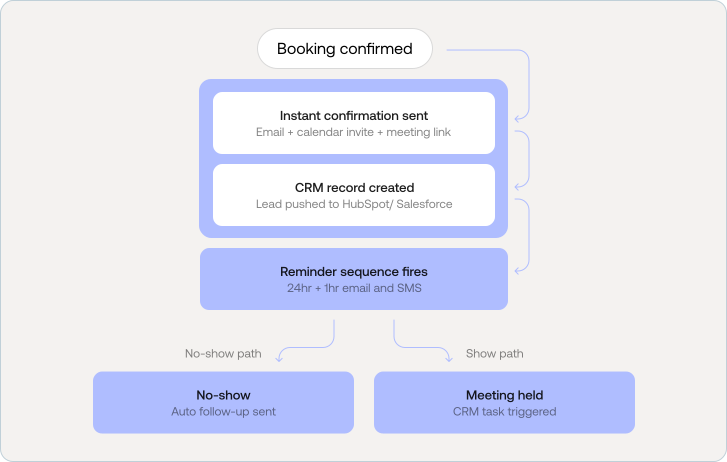
A confirmation email should go out immediately with a calendar invite, Zoom or Meet link (for virtual meetings), a summary of what the person booked, and clear instructions for what to prepare.
For B2B, SaaS, fintech, and AI companies, the booking data should push automatically to your CRM HubSpot, Salesforce, or Airtable creating a lead record with all the intake form context attached.
Send a reminder at 24 hours and again at 1 hour before the meeting. Include the joining link in both. SMS reminders in addition to email reduce no-show rates significantly, especially for service businesses.
Automated no-show follow-up a short, non-aggressive email offering to reschedule recovers a meaningful percentage of missed bookings. Most booking tools support this natively.
For sales teams, the meeting should automatically trigger a follow-up task in the CRM. For service businesses, it should kick off the next step in your onboarding or job management workflow.
B2B companies often need prospects to book discovery calls, demos, onboarding sessions, or consultations. A strong booking page reduces friction and helps qualified leads move faster through the funnel.
These businesses usually need a more trust-led booking experience. Clear messaging, better qualification fields, smoother UX, and stronger credibility signals improve both confidence and conversion rates.
Agencies and service firms can use booking pages for strategy calls, audits, consultations, and onboarding. This creates a more structured sales process and reduces manual scheduling overhead.
AI companies often need a flow for solution walkthroughs, proof-of-concept calls, pilot discussions, and implementation conversations. A clear booking experience helps explain the offer while qualifying interest.
For SaaS businesses, booking pages often support demo requests, onboarding calls, sales qualification, implementation support, and customer success sessions. In many cases, it becomes part of the revenue journey, not just a scheduling tool.
A booking page that nobody finds is a conversion tool that never gets used. Here are the technical and on-page optimizations that help your booking page rank and be discovered:
Before publishing, test the full experience from the user's point of view:
A booking website should do more than let people pick a time slot. It should help your business convert with less friction, qualify leads before your team touches them, and create a smoother experience from first click to first conversation.
For simple needs, DIY can work. For a more polished setup without a full agency investment, a vetted freelancer can be a smart option. For B2B companies, fintech brands, healthtech platforms, AI-based companies, SaaS businesses, and service firms where scheduled interactions drive revenue, an agency-led booking website often delivers the strongest long-term value.
The best booking website is the one that matches your workflow, removes unnecessary friction, and helps the right people book faster.

Both platforms have released major milestones this year. WordPress 7.0 ships on April 9, 2026, the most transformative WordPress release since Gutenberg, bringing native AI to the core for the first time. Webflow launched its Claude AI connector and MCP server in February 2026. Both have moved the goalposts.
This guide is the updated 2026 version of my 30-day test. I've refreshed every data point, added a new AI integration section, and updated the scorecard to reflect where both platforms actually stand today.
The philosophical difference between the two platforms hasn't changed, but both have made significant strides that narrow historical gaps.
Webflow remains the clear winner for non-developers. The onboarding survey tailors your tutorial to your experience level. Webflow University has hundreds of hours of video. The AI assistant answers design questions in context. Changes render live on the canvas, without a save-and-preview loop.
One note for 2026: Webflow's design system has grown more sophisticated, which means the learning curve for advanced features is steeper than it was two years ago. New users may feel a short plateau before things click.
WordPress's self-hosted setup remains multi-step: hosting, DNS, installation, theme, plugins, and page builder configuration. That hasn't changed. However, WordPress 7.0 brings a redesigned admin UI and real-time collaboration, closing a meaningful UX gap for editorial teams who collaborate on live sites.
WordPress.com (the managed version) is now significantly more beginner-friendly and more comparable to Webflow's onboarding. If you're evaluating 'ease of use,' specifying whether you mean WordPress.org (self-hosted) or WordPress.com (managed) matters a lot.
Webflow still offers unmatched design control for non-developers. The visual editor outputs clean, semantic CSS. Code Components (DevLink) now allow developers to inject React components that designers can reuse visually, bridging design and engineering without sacrificing either.
WordPress's Gutenberg Site Editor has matured significantly. Phase 3 (shipped with 7.0) brings full site editing to a more polished state. The gap between Gutenberg and Webflow's editor is narrower in 2026 than it was in 2024, though Webflow still offers finer CSS-level control without code.
Webflow continues to generate clean HTML/CSS hosted on a global CDN (AWS + Fastly) with HTTP/3, automatic image optimization, and edge caching built in. Zero plugin overhead.
WordPress 6.9 (December 2025) delivered real performance gains: CSS payloads reduced by 45%, TTFB improved by 19%, and LCP improved by 17% across benchmark sites. This meaningfully closes the default performance gap with Webflow, though a heavily plugged-in WordPress site on shared hosting still struggles.
Webflow's January 2026 AI Optimize tool adds AI-generated meta titles, descriptions, and automated hreflang support for international SEO, all without plugins. The built-in SEO audit panel flags missing elements. Clean code, native sitemaps, and strong Core Web Vitals give Webflow a solid technical SEO baseline.
Remaining gap: granular schema markup still requires custom code or App Marketplace integrations. WordPress plugins offer more built-in configuration depth for teams that need complex structured data.
Rank Math and Yoast remain best-in-class. WordPress's AI Client (WP 7.0) will enable AI-powered content audits and metadata generation, matching what Webflow launched in January 2026. Google's February 2026 Discover Core Update has also increased the importance of genuine topic authority, which plays to WordPress's strength as a long-form content platform.
Webflow's closed-source managed infrastructure means no plugin surface area to attack. Security patches deploy automatically to all hosted sites. SOC 2 Type II certification, global DDoS protection, and auto-backups are standard.
WordPress's 7.0 AI connectors store API keys in the WordPress database, the same location as post content and user data. While the prompt_ai capability restricts access to admins by default, teams adopting the new AI features should audit their database security accordingly.
About 20% of my client base runs e-commerce. Here's the 2026 picture, with one major Webflow change to flag.
WooCommerce released MCP integration documentation in February 2026, exposing store operations, orders, products, and customers as MCP tools through WordPress's Abilities API. This means AI agents can now manage WooCommerce stores programmatically. A meaningful step forward for enterprise e-commerce automation.
Webflow launched an official Claude AI connector and MCP server in February 2026. Through this connector, Claude can manage your Webflow CMS, run bulk content updates, trigger automated SEO audits, and manage site settings, all via conversation. The AI Optimize tool (January 2026) generates meta titles, descriptions, and schema markup natively within the Webflow editor.
WordPress 7.0 is the most significant AI release in WordPress's 23-year history. The WP AI Client becomes a core component (not an optional plugin); every WordPress 7.0 site has native AI infrastructure. The MCP Adapter converts WordPress abilities into tools that AI agents like Claude Desktop, Claude Code, and Cursor can discover and execute. WooCommerce has also published MCP documentation, making e-commerce operations AI-manageable.
Crucially, WordPress is provider-agnostic: Claude, GPT-4o, Gemini, and local Ollama models can all be connected through the Connectors settings page without locking you into any single AI vendor.
Webflow vs. WordPress: Which is better for your website? Sticker price comparisons understate WordPress costs. In 2026, Webflow's pricing has remained stable while WordPress's plugin ecosystem has grown more expensive for professional setups.
Still thinking about WordPress vs Webflow 2026: Which is Better for Your Business? Webflow remains the better choice for most small-to-mid businesses, agencies, and non-developer teams. The security advantage, performance defaults, and design control gap have not closed meaningfully.
But 2026 is the most competitive year yet. WordPress 7.0's native AI Client, real-time collaboration, and MCP adapter represent a genuine architectural leap. WordPress is evolving faster than at any point since Gutenberg. Teams with developers and complex content needs have a stronger case for WordPress today than they did a year ago.
The gap is narrowing. The decision still depends on your team, budget, and what you're building.
Your business needs a website, and the cost of building one from scratch with an in-house team in the USA adds up fast. Here's what you're looking at if you hire a development trio:
That's $241,000 a year before benefits, equipment, or office space. No wonder businesses are turning to no-code platforms. The real question is which one: Webflow or Wix?
This guide My Wix Studio vs Webflow Review: The Best Platform in 2026: both platforms across 10 categories with real performance data, 2026 platform updates, and a clear decision framework. No paid placements. No fluff.
Choosing between Webflow and Wix in 2026 comes down to one core question: do you want design control or speed of setup? Webflow, launched in 2013, is a design-first platform built for agencies, designers, and growing businesses that need pixel-level control, with plans from $14–$39/month and a library of over 6,000 professionally designed templates.
Wix, founded in 2006, is an ease-first builder aimed at freelancers, small businesses, and beginners, offering 900+ templates plus an AI site builder and pricing from $17–$159/month. As of 2026, Wix powers roughly 2.5% of all websites globally, while Webflow holds about 1.2% (W3Techs, 2026), making Wix the more popular choice for non-technical users and Webflow the preferred platform for design-led teams. In this guide, we break down pricing, templates, SEO performance, ease of use, and ideal use cases so you can pick the right builder with confidence.
This is the starkest difference between the two platforms, and you need to be honest with yourself about your team's comfort level.
Wix was built from day one for people who don't want to think about web design. You pick a template, drag elements around, and hit publish. Wix ADI (Artificial Design Intelligence) can generate a complete site from a few prompts about your business in minutes. For a restaurant owner, salon, or freelancer, this is genuinely powerful.
In 2026, Wix Studio adds more professional-grade controls: custom breakpoints, CSS overrides, and grid-based positioning. The gap between Wix and professional builders has narrowed, but it still requires patience to achieve complex custom layouts.
Webflow's learning curve is real. The interface mirrors how professional CSS works, including the box model, flexbox, and grid, which means experienced designers love it, but beginners can feel overwhelmed in the first hour. Webflow University (hundreds of free video courses) and an active community forum help significantly.
The payoff: once you're past the curve, Webflow gives you design control that matches hand-coded sites. No fighting with theme limitations.
Webflow is in a different class for design customization. You're not editing a template; you're building from a blank canvas using real CSS properties. Every margin, animation, interaction, and responsive breakpoint is configurable. The output is clean, exportable HTML/CSS/JS.
In 2026, Webflow AI suggests layouts, auto-generates class names, and helps apply consistent styling across pages, a genuine time-saver for design teams.
Wix's standard editor lets you drag elements anywhere, which is great for freedom of placement but creates challenges for responsiveness. Wix Studio addresses this with a proper grid system and custom breakpoints. Over 900 templates cover virtually every Webflow vs Wix: Complete Business Comparison (2026) category.
The honest limitation: Wix templates can feel constraining as your site grows. Complex custom layouts, animations, and interactions require workarounds that Webflow handles natively.
URL structure is a foundational SEO factor. A clean, descriptive URL (yourdomain.com/webflow-vs-wix) is easier for search engines to index and understand than a messy auto-generated one.
Webflow gives you full control over URL slugs for every page, blog post, and CMS collection item. You can structure URLs exactly how you want, by category, date, topic, or a custom hierarchy. 301 redirect management is built in, which is critical when restructuring your site without losing SEO equity.
Wix allows you to edit the URL slug (the end part after the slash) but doesn't give you full hierarchical control. For example, you can change /post/my-article-title, but you can't create folder-style structures like /blog/category/article. For most small sites, this is fine. For content-heavy SEO strategies, it's a limitation.
Webflow generates lean, semantic HTML5 by default: no plugin bloat and no theme framework overhead. Every site is served through a global CDN (AWS + Fastly) with HTTP/3 and automatic image compression. The result is consistently strong Core Web Vitals scores out of the box.
Wix has made real performance improvements in 2025–2026, particularly with their infrastructure upgrades. However, the ease-of-use architecture (allowing unrestricted element placement) can generate less optimal code. Wix's built-in SEO Wiz provides step-by-step guidance for beginners, a genuine advantage for small businesses new to SEO.
Over 60% of web traffic comes from mobile devices. Google's mobile-first indexing means your mobile site is what Google crawls and ranks. This category is non-negotiable.
Webflow gives you full control over how your site looks at every screen size. You can set specific styles for desktop, tablet, landscape mobile, and portrait mobile independently. This granular control means your site can look truly polished on every device, but it requires you to actively design each breakpoint.
Wix handles mobile optimization differently; it generates a mobile version automatically, and you can switch to a mobile editor to fine-tune. This works well for template-based sites. Wix Studio adds custom breakpoints, narrowing the gap. The auto-generation is convenient, but can produce inconsistencies between Android and iOS rendering on more complex layouts.
E-commerce is one of the categories the original article didn't cover, and it's where Wix and Webflow diverge significantly.
Wix's e-commerce is comprehensive for small-to-mid stores: up to 50,000 products, 100+ payment gateways, native POS, dropshipping, subscriptions, and multichannel selling, all without transaction fees. This makes Wix a strong choice for small business retail.
Webflow's e-commerce is design-forward but feature-limited. The 2% transaction fee on the base e-commerce plan is a meaningful cost for growing stores. Native POS, dropshipping, and subscription products all require third-party integrations. Where Webflow wins is checkout design, with full visual control over every step of the purchase flow.
If your site will include a blog, case studies, team profiles, or any dynamic content, the CMS is critical. This is where the platforms diverge most sharply for content-heavy businesses.
Webflow's CMS is its standout feature for content teams. You create 'Collections' custom content types, and design templates that automatically apply to every item. A blog, a portfolio, a product catalogue, a team directory, all built with structured, reusable content fields. The 2026 Next-Gen CMS supports up to 1 million items per project and includes a headless API for programmatic content access.
Wix's content management is simpler. Blog posts, products, and galleries are easy to manage. But Wix's CMS doesn't support the same level of custom content structure that Webflow does. For a simple blog or small product catalogue, Wix is perfectly capable. For complex content architectures, it hits walls.
Both platforms have made AI a priority in 2026. Here's what's actually available, not what's been announced.
Webflow AI (in beta across paid plans) assists with: layout suggestions, class name generation, consistent style application across pages, CMS field population, and AI-powered meta title/description generation (AI Optimize, launched January 2026). It's positioned as a smart design assistant, it accelerates professional workflows without replacing design judgment.
Wix's AI is positioned at a different audience. Wix ADI can generate a full website from a few business prompts, genuinely useful for a first-time site owner. The AI editor provides content suggestions, image generation, and SEO guidance. In 2026, Wix added AI-powered product descriptions and marketing copy generation for e-commerce sellers.
Both platforms support third-party integrations, but through different models the right choice depends heavily on whether you need off-the-shelf solutions or custom connectivity.
Webflow supports custom code embeds, native API connections, and integrations via Zapier, Make, and direct REST APIs. For developer-led teams, this means Webflow can connect to virtually any third-party service. The Webflow App Marketplace (growing in 2026) provides vetted one-click integrations for popular tools.
Wix App Market offers 500+ apps covering marketing, booking, chat, e-commerce, and analytics. Most integrations are point-and-click, no code required. For small businesses needing CRM, booking, live chat, or email marketing, Wix's App Market is genuinely excellent.
Both platforms have transparent pricing but the true cost depends on which features you actually need.
Key 2026 pricing notes:
Webflow sites consistently serve larger organic audiences, partly due to stronger SEO architecture, partly because brands that choose Webflow tend to invest more heavily in content strategy. Wix sites load faster in many cases because they serve smaller, less content-heavy sites. This isn't a platform speed difference, it's a use-case difference. A fair comparison requires sites of equivalent scope.
'We've been running an offline business, but as times are changing, it's time to establish our brand's digital presence. Some owners suggested Webflow, others recommended Squarespace, which one should we choose?'
That question came from a prospective lead on LinkedIn. It's one of the most common questions businesses face when moving online for the first time. This guide answers it with real data, updated 2026 platform information, and an honest assessment of both platforms, not a promotional pitch.
The following is the honest impression on Webflow vs. Squarespace:
This is the most important category for businesses new to website building and it's the one missing entirely from the original article.
Squarespace is designed for people who want to go from zero to published without learning web design. The Fluid Engine drag-and-drop editor uses familiar interactions. Its 150+ professionally designed templates eliminate the blank-canvas problem. Most users can have a fully functional, polished website live within 2–4 hours of signing up.
In 2026, Squarespace's AI website builder can generate a complete site from your business description and brand prompts, reducing setup time further. This is a genuine advantage for a bakery owner, salon, or any local business that needs results fast.
Webflow has a real learning curve. The interface mirrors how professional CSS works, box model, flexbox, grid layout, z-index, which means it's powerful but unfamiliar for non-designers. Most beginners spend 5–10 hours with Webflow University tutorials before feeling comfortable.
The payoff is significant: once past the learning phase, Webflow gives design control that no template-based builder can match. For businesses where the website is a core marketing asset, that investment pays dividends.
Webflow is in a different category for design control. You're not editing a template, you're building with real CSS properties applied visually. Every margin, animation, responsive breakpoint, interaction, and hover state is configurable without writing code. The output is clean, exportable HTML/CSS/JS, the same code a professional developer would write.
Key 2026 additions: Webflow AI assists with layout suggestions, class naming, and style consistency. Code Components (DevLink) allow React components to be built by developers and reused visually by designers bridging the engineering and design workflow.
Squarespace's Fluid Engine offers section-based drag-and-drop editing. Its 150+ templates are professionally designed, arguably better curated than Webflow's larger but inconsistent template library. Style Editor adjusts fonts, colours, and spacing globally.
The honest limitation: Squarespace's template structure is the ceiling of your design. Custom layouts, complex animations, and pixel-level element control require CSS/JavaScript injection (available only on Business and Commerce plans) or a developer.
Webflow generates lean, semantic HTML and CSS with no plugin bloat. Every site is served via a global CDN with HTTP/3, automatic WebP image conversion, lazy loading, and edge caching. These aren't optional features, they're built into every Webflow site by default.
Squarespace's Fluid Engine editor generates more JavaScript per page due to its interactive drag-and-drop architecture. Templates carry framework overhead that adds to page weight. Performance has improved in 2025–2026, but Squarespace consistently trails Webflow on Core Web Vitals benchmarks.
Webflow provides comprehensive technical SEO control: per-page meta titles and descriptions, custom URL slugs, Open Graph tags, schema markup (via custom code), canonical URLs, robots.txt editing, and XML sitemap management. The clean code output means no plugin-injected scripts cluttering the DOM, a meaningful advantage for crawlability.
In January 2026, Webflow launched AI Optimize, AI-generated meta titles, descriptions, and image alt text across all pages and CMS items. Automated hreflang support for international SEO was also added natively.
Squarespace covers essential SEO well: clean URL structures, meta tags, automatic SSL, image alt text, and XML sitemaps are all included. The SEO panel provides a guided checklist, genuinely helpful for businesses new to SEO.
The limitation: Squarespace's robots.txt file is partially editable (only index/noindex, not full directive control). Schema markup requires workarounds. For competitive SEO strategies where technical factors are tiebreakers, Webflow's additional controls matter.
E-commerce is where Squarespace closes the gap and, in several areas, takes the lead. Here's the honest breakdown:
Webflow's e-commerce is design-forward. You have full visual control over product pages, checkout flows, and the entire shopping experience which makes it excellent for brands where aesthetic differentiation drives conversion. However, the base plan charges a 2% transaction fee (waived on the $74/month plan), PayPal is not supported natively, and key features like subscriptions and POS require third-party integrations.
Squarespace's e-commerce is more feature-complete for typical small business retail. Zero transaction fees on Commerce plans, PayPal support, built-in email marketing, native POS, subscription products, and abandoned cart recovery are all available without additional tools. For a bakery offering nationwide delivery, Squarespace covers the operational stack Webflow leaves to integrations.
Content management is where the platforms diverge most sharply for growing businesses.
Webflow's CMS uses 'Collections' custom content types you define from scratch. A blog collection has different fields from a case studies collection, which differs from a team profiles collection. Each collection has a custom-designed template that applies automatically to every item. This structured approach scales beautifully: the 2026 Next-Gen CMS supports up to 1 million items per project, with a headless Content Delivery API for programmatic access.
Practical impact: 'We've saved a huge amount of time by switching from Squarespace to Webflow specifically with managing the blog,' as one agency reported after migration. The structured CMS eliminates manual formatting work across large content libraries.
Squarespace handles blog posts, products, events, and galleries through preset content types. For standard publishing workflows, write post, add image, publish, it works cleanly and intuitively. The limitation is flexibility: you cannot define custom content types, and dynamic page templates are constrained to Squarespace's built-in structures. For a simple blog or small product catalogue, this is perfectly adequate. For complex content architectures, it becomes restrictive.
Both platforms are managed hosting solutions, you don't manage servers, security patches, or infrastructure. The differences are in the details.
Webflow provides enterprise-grade security: SSL encryption on all sites, automatic backups from day one, SOC 2 Type II certification, global DDoS protection, and customisable access controls with granular role permissions. Uptime averages 99.99% (monitored independently). Because Webflow is closed-source with no plugin ecosystem, the attack surface is significantly smaller than open-source alternatives.
Squarespace provides solid baseline security: SSL on all plans, automatic backups, and DDoS protection. Security is adequate for small-to-mid business websites. The platform lacks SOC 2 certification and the fine-grained permission controls Webflow offers at enterprise level.
Support quality is a practical daily concern especially for business owners without technical teams.
Squarespace provides 24/7 live chat and email support on all paid plans. The support team is consistently rated as responsive and knowledgeable for common issues. This hands-on support model is a genuine advantage for non-technical users who need quick answers during a website build or maintenance task.
Webflow's support model is education-first: Webflow University (hundreds of hours of free video courses), an active community forum, a comprehensive help centre, and a global Experts marketplace. Live support is available on higher-tier plans. For Enterprise customers, dedicated account management is included. For self-serve users, the expectation is that Webflow University covers most questions, which it does, but it requires time investment.
Both platforms have invested in AI features in 2025–2026. This category deserves more depth than the single paragraph it received in the original article.
Webflow AI focuses on professional design workflows: layout suggestions, class naming, style consistency across pages, CMS field population, and AI-generated meta titles and descriptions via AI Optimize (launched January 2026). The Claude AI connector and MCP Server (February 2026) enable AI agents to manage your Webflow CMS, run SEO audits, and update content programmatically. These are tools for design and marketing professionals they accelerate professional workflows without replacing design judgment.
Squarespace's AI is positioned at a broader audience. The AI website builder generates a complete site from brand prompts including name, colours, content tone, and business type in under a day. This is genuinely impressive for a first-time site owner. AI-powered content suggestions, image generation, and marketing copy tools extend the value. In 2026, Squarespace added AI-powered product descriptions for e-commerce sellers.
The original article showed pricing screenshots without actual numbers. Here are the real figures, current as of April 2026:
Webflow charges $15/user/month for additional editors, a meaningful cost for larger content teams. Squarespace includes multiple contributor seats in all plans. Webflow's 2% transaction fee on the base e-commerce plan ($29/mo) adds up for growing stores and you need the $74/mo plan to eliminate it. Squarespace has 0% transaction fees on all Commerce plans.
Squarespace includes built-in email marketing (Squarespace Email Campaigns) Webflow requires a third-party integration (Mailchimp, ConvertKit, etc.) at additional cost. For businesses planning email as a marketing channel, this is a real hidden cost difference.
Webflow wins overall but this is not a landslide. The score difference is smaller than most comparisons suggest.
Squarespace wins 4 of 10 categories: ease of use, e-commerce, customer support, and pricing. These are exactly the factors that matter most to small businesses launching their first website. If you need to go live fast, sell products without technical overhead, and get 24/7 help when something breaks, Squarespace is the right choice and you should not feel you're settling.
Webflow wins 6 of 10 categories, with larger margins in design, performance, SEO, and CMS. These factors compound over time. A Webflow site built well in year one typically outperforms its Squarespace equivalent in organic traffic, conversion rate, and scalability by year two. For businesses where the website is a primary growth channel, that gap matters.
Working with a Webflow agency removes the learning curve entirely, you get the platform's capabilities without the time investment.
Over 26% of small businesses struggle to choose the right eCommerce platform and the Webflow vs Shopify decision is one of the most common sticking points. Both platforms can technically power an online store, but they are built for fundamentally different business priorities.
Still thinking Webflow vs Shopify 2026: Which is The Better Option? This guide breaks down every dimension that matters in 2026 of Webflow vs Shopify: Researcher’s Deep Dive 2026: setup complexity, design control, eCommerce features, SEO capabilities, pricing, and who each platform is actually built for, with a Buzz Interactive verdict on each.
How quickly can you launch a store? The two platforms take fundamentally different approaches and neither is universally easier.
Webflow starts with a blank canvas or template , there is no guided eCommerce wizard. You manually configure navigation, product pages, collection templates, and checkout flow. This gives you complete creative control but requires more upfront decisions. For teams working from a Figma design, Webflow's pixel-precision environment is a natural fit. For non-designers launching their first store, the learning curve is real.
Shopify's step-by-step wizard guides you from account creation through product addition, payment setup, and launch. With over 100 themes available out of the box, a non-technical founder can have a functional store live within hours. The tradeoff: your store will look like other Shopify stores unless you invest significantly in theme customization or a Shopify developer.
This is where Webflow's advantage is most pronounced. Webflow gives designers a true visual development environment with every element, interaction, and breakpoint is controllable without touching code. Shopify's theme editor operates within the constraints of the Liquid templating system, limiting deep customizations to what the theme architecture permits.
Shopify was built for eCommerce from the ground up; Webflow added eCommerce as a product extension. This architectural difference shows in feature depth especially at scale.
Webflow eCommerce supports physical products, digital downloads, and services. In 2026, capabilities include custom checkout design, inventory management, abandoned cart emails, discount codes, and subscription products via third-party integrations. Webflow Logic now triggers post-purchase automations without third-party tools. Webflow eCommerce is designed for mid-market brand stores where design differentiation is as important as the purchase flow.
Shopify's eCommerce depth is unmatched in its tier. In 2026: multichannel selling across Instagram, TikTok, Facebook, Amazon, and eBay; Shopify POS for physical retail; native subscription support; Shopify Markets for multi-currency international selling; B2B wholesale tools on Plus; and 8,000+ app integrations. Shopify's checkout conversion rate is among the highest in the industry, backed by one-tap Shop Pay.
SEO is one of the most consequential differences between the two platforms and it is where Webflow's architectural advantages are most measurable.
Headline prices are only part of the story. Shopify's transaction fees and app ecosystem mean real costs often exceed the plan price significantly.
Consider the following whether you are using webflow or shopify:
Use this decision matrix to choose in under 60 seconds.
Webflow and Shopify are not interchangeable, they are optimized for different business models.
Choose Webflow when design, SEO, and brand experience are your primary competitive advantages. Choose Shopify when sales volume, operational scale, and multichannel reach are what you are optimizing for.
If you are still unsure, the Webflow + Shopify hybrid approach gives you the best of both: Webflow's brand and SEO capabilities on the front end, Shopify's proven checkout infrastructure on the back end.
'How much does a website really cost?' That question came from a prospect with no patience for vague answers. So instead of deflecting, we put together the most complete pricing guide we could, real numbers, real ranges, no filler.
The honest answer: a website can cost $60/year or $600,000/year. That range is real and not a cop-out. What you pay depends entirely on what you're building, who builds it, and what platform you use. This guide breaks down every variable so you can make a confident, informed decision.
Before diving into numbers, understand the five primary cost drivers. Every quote you receive is shaped by some combination of these:
The most searched question after 'how much does a website cost' is 'how much for my type of business?' Here are real ranges by website category:
A domain name is your online address, the URL visitors type to find you. It's one of the smallest costs in website ownership and one of the most important decisions you'll make.
What does a domain name cost?
Standard .com domains cost $7–$20/year. Premium or short domains can reach thousands. Country-specific domains (.co.uk, .com.au) typically run $10–$30/year. Specialty domains (.io, .ai, .agency) average $30–$80/year.
Hosting is where your website's files live. The right hosting type depends on your CMS and traffic expectations. Platforms like Webflow, Wix, Shopify, and Squarespace include hosting in their monthly fee,
no separate purchase needed.
SSL (Secure Sockets Layer) encrypts data between your website and visitors, it's what puts the padlock in your browser's address bar and converts your URL from http:// to https://. Without it, browsers display 'Not Secure' warnings that damage trust and hurt SEO.
Design is often the largest upfront investment for first-time website owners, and the decision you'll live with longest. There are four routes, each with a distinct cost profile.
Every major platform offers free or low-cost templates. This is the fastest and cheapest path to a live, functional website. The trade-off: your site may look similar to thousands of others using the same template.
A freelance web designer gives you a customised look without the cost of an agency. Rates vary widely based on experience, location, and platform specialisation.
A custom Webflow build via an agency gives you the best of both worlds: design freedom without hand-coding, clean output that performs well on SEO and Core Web Vitals, and a visual editor your team can use to update content without a developer.
Unlike generic templates, a custom Webflow design is built specifically for your brand's visual identity, content structure, and conversion goals. Animations, interactions, dynamic CMS pages, all without writing a line of code.
Once design decisions are made, development is the second major cost variable. You have four realistic paths, each with different cost structures and trade-offs.
Platforms like Wix, Squarespace, Webflow Starter, and Shopify let you build and launch without any technical knowledge. This is the lowest cost path, and the right one for many small businesses.
A freelance developer builds your site, typically to a brief. Good for defined projects with clear scope. Less suitable for complex, evolving requirements.
A specialist Webflow agency handles everything: strategy, design, development, SEO structure, and launch. You get a professional team with accountability, process, and post-launch support.
Hiring a full internal team gives maximum control and flexibility, but at a cost that's only justifiable for large businesses with complex, ongoing website needs.
This is the section most website cost guides skip and the reason so many businesses go over budget. Hidden and ongoing costs can add 40–60% to your first-year estimate if you don't plan for them.
Now let's put it all together. Here are realistic all-in annual costs for each build path including domain, hosting, design tools, maintenance, and basic content needs.
This is the decision most business owners actually need help with, not just the numbers, but the trade-offs.
Use this framework to decide:
'We want to revamp our About Us page but have no idea where to start.' That question came from a SaaS team during a webinar but we hear it from businesses of every size. This guide answers it with nine annotated Best About us Page Examples For Design Inspiration examples and, for each one, a final verdict: who it's best for and exactly what Buzz Interactive US can build for you based on that approach.
An about us page examples to connect with customers is where visitors decide whether to trust you. It sits at a critical point in the buyer journey, visitors have already found you, but they haven't yet committed. A strong About page tips that balance.
Every high-converting About Us page contains these six elements , in some combination and order that fits your business type.
For each example below, we've analysed the specific design and copy decisions that make the page work and added a Final Verdict: who the style suits, and what Buzz Interactive US can build for you using that approach.
Hugging Face is an open-source AI community where model demos, datasets, and research are shared publicly. Their About page is a live dashboard of community activity: dynamic, technical, and constantly updated.
Duolingo makes language learning free and addictive. Their About page is a masterclass in brand consistency, every design choice reinforces the same feeling as the app itself: playful, approachable, and energetic.
Glossier championed 'skin first, makeup second.' Their About page embodies the brand's philosophy: minimal, personal, and aesthetically precise.
Oatly is a Swedish oat-based food company with a brand voice that's become an industry benchmark for personality. Their About page doesn't read like corporate copy, it reads like a letter from a friend.
Midjourney is an independent AI research lab. Their About page visually communicates what the tool does before a single word is read: immersive, futuristic, and immediately distinctive.
Rivian builds electric adventure vehicles. Their About page positions them not as a car company but as a mission-driven movement, for people who believe exploration and sustainability can coexist.
Brightcove is a video platform for enterprise content delivery. Their About page serves a professional B2B audience with a clean, credibility-led design, clarity over personality.
GIPHY is the world's largest GIF platform. Their About page balances brand vibrancy with clean, scannable content, fun without being overwhelming.
RXBAR is a protein bar brand built on radical transparency, the ingredients are on the front of the pack. Their About us page content uses that same honesty as its entire design philosophy.
Step 1: Define your reader before writing
Your About Us page is not for you: it's for your reader. Before writing, answer: Who arrives at this page? What are they deciding? A marketing director evaluating an agency has different needs from a first-time buyer deciding whether a skincare brand's values match theirs.
Step 2: Write your origin story
Start with the problem you set out to solve, or the moment you decided to start. Formula: 'We started [brand] because [specific problem]. After [journey], we built [solution]. Today, [impact].'
Step 3: Write your mission statement
One or two sentences that capture what you're working toward, not what you sell, but what you're building. Duolingo: 'Free language education for everyone.' RXBAR: 'No BS.' Oatly: 'We exist to make it easy for people to turn what they eat into personal moments of joy.'
Step 4: Introduce your team
Real names, real photos, and one-sentence descriptions. A team section turns a company into people and people are easier to trust than logos.
Step 5: Add 2–4 trust signals
Awards, press coverage, notable clients, years in business, customer count, certifications. Choose the 2–4 strongest, don't overload.
Step 6: Write your CTA
One clear next step matched to your business goal: 'Schedule a free consultation', 'View our portfolio', 'Start your free trial'. One CTA only multiple options create decision paralysis.
Every example in this guide represents a design approach that Buzz Interactive US can build for you ,custom, on Webflow, optimised for performance and conversion. Whether you're inspired by RXBAR's founder authenticity, Midjourney's dark immersive aesthetic, or Glossier's editorial minimalism, we can translate that approach into a page that's distinctly yours.
Ready to Build Your About Us Page?
Buzz Interactive US specialises in custom Webflow design, we can implement any of the nine styles in this guide, built specifically for your brand, your audience, and your goals.
Contact Buzz Interactive US → buzzinteractive.com
'Wait! you can run an online store on Webflow?' That's the reaction most people have the first time they encounter Webflow E-Commerce. And it's a fair reaction, Webflow built its reputation as a design and CMS platform, not a commerce engine.
But as the no-code movement has grown and design-led brands have demanded more visual freedom, Webflow has invested seriously in e-commerce. The real question and the one this guide answers: is whether those investments make it a genuine contender against Shopify and WooCommerce, or whether it remains a niche choice for specific use cases.
Short answer: Webflow is excellent e-commerce for the right store. It's the wrong choice for the wrong store. This guide helps you figure out which category you fall into.
Webflow E-Commerce is an extension of the core Webflow platform that lets you design, build, and launch online stores, visually, without writing code. If you're familiar with Webflow's website builder, think of e-commerce as the same drag-and-drop design power with product pages, shopping carts, checkout flows, and inventory controls layered on top.
The biggest appeal is design freedom. Unlike rigid templates on traditional platforms, Webflow gives you pixel-level control over your storefront, no compromises on branding, layout, or UX. You build product pages, cart interactions, and checkout flows from scratch or from a starting template that you customize completely.
Before evaluating Webflow for e-commerce, it helps to have a clear picture of what's native to the platform and what requires third-party tools.
Webflow isn't just drag-and-drop, it's design-first. You have full control over every element: product grid layouts, custom animations, hover states, scroll interactions, and page transitions. No templates, no limits. This makes it the platform of choice for designers and brands that want a genuinely unique storefront that doesn't look like every other Shopify store.
The practical result: your store can feel like a branded editorial experience, not a checkout wrapper. Webflow's Interactions panel lets you build 'Add to Cart' microinteractions, product image parallax effects, and story-driven product layouts, all without JavaScript.
Webflow's SEO controls are among the most comprehensive of any website platform, let alone any e-commerce platform. You get per-page control over meta titles, descriptions, Open Graph tags, canonical URLs, schema markup (via custom code), and auto-generated XML sitemaps. The built-in CMS integrates seamlessly with e-commerce, letting you build content-commerce hybrids: blog posts that link to products, editorial landing pages with embedded checkout, and dynamic collections that drive SEO traffic.
Shopify locks product URLs under /products/ and collections under /collections/. Webflow lets you define your own URL structures which is a meaningful technical SEO advantage for brands that invest in organic search.
Every Webflow site is hosted on Amazon Web Services (AWS) with a global CDN, HTTP/3, automatic SSL, daily backups, and 99.99% uptime. You don't manage hosting, security patches, or server configuration. This is a significant operational advantage over WooCommerce and, to a lesser extent, self-hosted Shopify alternatives.
Core Web Vitals performance is typically excellent by default, Webflow's clean HTML/CSS output and global CDN mean pages load fast without additional configuration.
No other e-commerce platform matches Webflow's native animation capabilities. Product reveal animations, scroll-triggered content, custom cart drawer interactions, and branded loading sequences are all achievable without plugins or JavaScript. For brands where the shopping experience is the product, luxury, lifestyle, creative, this is a decisive advantage.
Webflow connects to Stripe, PayPal, Mailchimp, Klaviyo, Airtable, Memberstack, and Zapier via native integrations or REST APIs. For marketing automation, CRM, and email flows, you can build sophisticated customer journeys without leaving the platform ecosystem.
Webflow's 50-variant limit per product is its most significant e-commerce constraint. A product with three options (size, colour, material) can quickly exceed this ceiling. Shopify raised its variant limit to 2,048 in 2025, a 40x advantage. For apparel, accessories, or any configurable product category, this difference is often decisive.
Out of the box, Webflow doesn't support: customer accounts or wishlists, subscription or recurring billing, abandoned cart recovery, multi-language or multi-currency storefronts, or a POS system for in-person sales. Each feature can be added via third-party tools (Memberstack, Stripe Billing, Weglot, etc.), but each addition costs money, adds setup complexity, and introduces potential failure points.
Webflow supports Stripe, PayPal, Apple Pay, and Google Pay. That works for most US-based and global stores. But Shopify supports 100+ payment gateways, including region-specific options for Southeast Asia, Latin America, and Eastern Europe. If your customers are in regions with specific payment method preferences, Webflow's limited gateway options may lose you sales.
Webflow allows a maximum of 3,000 products across all e-commerce plans. Shopify and WooCommerce have no product limits. For boutique stores, 3,000 is more than sufficient. For any business managing a large catalogue, dropshipping, wholesale, or multi-category retail, this ceiling requires careful consideration.
Webflow charges a 2% transaction fee on its $29/month Standard e-commerce plan. This fee only disappears on the $74/month Plus plan or higher. Shopify also charges transaction fees (0.5–2%) unless you use Shopify Payments. WooCommerce charges no platform transaction fees.
Adding products in bulk is cumbersome on Webflow compared to Shopify or WooCommerce. There's no native CSV bulk import for products with full attribute sets. For stores migrating from another platform or launching with an existing catalogue, this is a real operational friction point.
Webflow gives you full visual control, <you're building layouts from scratch, not editing within a theme's constraints. Product pages, cart interactions, checkout flows, all custom. Shopify's themes are beautifully designed, but you're always working within a structural framework. Deep customization requires Liquid code or third-party page builders.
For brands where the shopping experience IS the brand, luxury, lifestyle, editorial; Webflow is in a different class. For brands where the shopping experience just needs to function reliably, Shopify's themes are excellent as-is.
Shopify was built for e-commerce from day one. It ships with: 100+ payment gateways, multi-currency and multi-language, built-in abandoned cart recovery, a native POS system, advanced analytics, and Shopify Shipping for label printing. Webflow covers the basics but requires third-party tools for most of these features.
The 2025 variant update (Shopify: 2,048 variants vs Webflow: 50) underlines this gap for product-heavy stores.
Webflow's technical SEO controls are more flexible than Shopify's. URL structures are fully customisable (Shopify locks you to /products/ and /collections/). Robots.txt is fully editable. Schema markup, sitemap management, and canonical tag control are all granular. For content-heavy commerce brands that treat blogging and SEO as primary acquisition channels, Webflow's CMS + SEO combination is a meaningful advantage.
Shopify is built to scale from a $0 startup to a billion-dollar enterprise. Brands like Gymshark, Heinz, and Kylie Cosmetics run on Shopify Plus. Its infrastructure handles traffic spikes, inventory sync across channels, advanced automation, and global operations. Webflow is ideal for small to mid-sized stores beyond that, you'll feel the constraints.
Webflow's pricing is more predictable than Shopify's. Shopify's true cost grows as you add apps, many essential features (reviews, loyalty programs, subscriptions) require paid apps on top of the monthly plan. Webflow's pricing is more all-in, though the 2% transaction fee on the Standard plan is a genuine gotcha.
Learn more about Webflow Vss Shopify.
Webflow is unmatched for front-end design without code. WooCommerce's design depends on the WordPress theme you choose. Highly custom designs require developer involvement in PHP and CSS or a premium page builder like Elementor. Webflow gives you that same creative freedom without touching code.
WooCommerce is open-source and infinitely extensible. Tens of thousands of WordPress plugins cover custom shipping rules, complex pricing engines, subscription management, membership systems, and virtually any workflow you can imagine. Webflow's integration ecosystem, while growing, cannot match this breadth.
Webflow is fully managed. No server updates, no plugin conflicts, no security patching, no hosting configuration. WooCommerce requires hands-on management: WordPress core updates, plugin updates, theme updates, hosting management, and security monitoring. For non-technical business owners or lean teams, this ongoing burden often becomes the hidden cost that makes WooCommerce less affordable than it appears.
One of the most important developments in 2026 that the original article missed entirely: the Webflow + Shopify hybrid is now one of the most popular setups among premium brands and design agencies.
The architecture is simple: Webflow handles the entire front-end brand experience, homepage, product editorial pages, blog, landing pages, animations while Shopify manages the back-end operations: checkout, payments, fulfillment, and inventory. The two are connected via the Shopify Buy Button or apps like Shopyflow or Looop.
This section was missing entirely from the original article. Here are the actual numbers, verified April 2026.
One of the gaps in the original article was the absence of real-world examples. Here are real brands and business types that have built successful e-commerce on Webflow:


.svg "Upward index finger gesture icon")