Oops! Something went wrong while submitting the form.
Built for companies ready to scale
Created on:
March 26, 2026
Published on:
If your business depends on demos, consultations, discovery calls, onboarding sessions, service appointments, or any scheduled interaction, a booking website can become one of the most valuable conversion points on your entire site.
A booking website is a website or landing page that lets users choose a service, view available time slots, submit relevant details, and book online often with payments, reminders, meeting links, CRM handoff, and pre-qualification forms built in Businesses investing in better booking flows often benefit from professional web development services to make sure the experience supports both usability and conversion..
This is no longer a tool just for salons or clinics. Today, booking websites are equally critical for:
B2B companies fintech, healthtech, legaltech, and martech brands
Service companies agencies, consultants, studios, and local providers
AI-based companies booking demos, pilot calls, and solution walkthroughs
SaaS companies product demos, onboarding calls, and customer success sessions
Whether the goal is a sales demo, strategy call, or service appointment, a strong booking website reduces friction and helps people take action faster.
Who needs a booking website today?
B2B companies
Sales demos, discovery calls, qualification meetings, and onboarding sessions for complex B2B products.
Fintech
Healthtech
Legaltech
Martech
Service companies
Strategy calls, audits, consultations, and onboarding sessions for agencies, coaches, clinics, and local providers.
Agencies
Consultants
Clinics
Local services
AI-based companies
Product demos, pilot calls, proof-of-concept discussions, and implementation walkthroughs.
Demo calls
Pilot sessions
Walkthroughs
SaaS companies
Product demos, onboarding calls, implementation support, and customer success sessions.
Demo booking
Onboarding
CS calls
Who should build a booking website?
A booking website makes sense for any business that needs users to schedule before they buy, start, or speak with your team. This includes:
B2B companies booking demos, consultations, and qualification calls
Fintech and healthtech brands that need a trust-led scheduling flow
Service businesses including agencies, consultants, and coaches
AI companies booking walkthroughs, pilot discussions, and discovery sessions
SaaS companies handling demos, onboarding, and customer success calls
Clinics, wellness practices, and fitness businesses
Home service companies electricians, plumbers, and repair teams
If a scheduled interaction plays a role in revenue, lead qualification, onboarding, or service delivery, a booking website should not be treated as a side feature. It is part of your growth system.
Why a booking website matters
A booking website does more than automate scheduling. It turns interest into action without unnecessary delay. It helps you:
Reduce manual back-and-forth
Let users book instantly, any time of day
Qualify leads before your team spends time on them
Collect useful context before the meeting
Accept payments or deposits where needed
Reduce no-shows with automated reminders
Sync calendars to avoid double-booking
Create a cleaner handoff from marketing to sales or service delivery
For B2B, SaaS, fintech, healthtech, and AI-based companies, this is especially useful because the website often acts as the first step in the sales journey. Instead of sending traffic into a generic contact form, a booking page lets qualified users schedule a demo, consultation, or onboarding call immediately.
How a booking website improves conversion
Dark Theme Flow Steps
Visitor
lands on page
Less friction
Chooses
service or demo
Faster path
Submits
details + context
Better leads
Books
instantly, 24/7
No waiting
Gets
reminder + link
Fewer no-shows
Shows up
pre-qualified
Higher close
What features should a booking website includes
A booking website should feel simple for the user, but it needs the right systems behind it. Here are the nine essential features every strong booking website should have:
1. Service or meeting selection
Users should be able to choose the exact booking type they need book a strategy session, schedule a product demo, reserve an onboarding call, or request a technical walkthrough.
2. Real-time availability and calendar sync
Your booking system should sync with Google Calendar or Outlook so users only see real open slots and you never get double-booked.
3. Intake forms and qualification fields
A strong booking flow collects the right information before the call or appointment. For B2B, SaaS, and AI companies this may include company size, service type, project scope, budget range, use case, implementation timeline, and industry.
4. Payment or deposit collection
For service businesses, paid consultations, or classes, your booking page should support payment or deposit collection through Stripe, PayPal, or Square.
5. Automated confirmations and reminders
Email and SMS reminders reduce no-shows and keep users informed. A 24-hour and 1-hour reminder sequence is the industry standard.
6. Mobile-friendly UX
A large share of bookings happen on mobile. If the form, date selector, or payment flow feels clunky, drop-off will increase sharply.
7. Time-zone handling
Essential for remote businesses, global SaaS teams, and B2B companies serving multiple regions. Automatic time-zone detection removes a major source of confusion.
8. Video call integration
For virtual bookings, your system should automatically generate Zoom or Google Meet links at the point of confirmation.
9. CRM or workflow integration
For B2B, SaaS, fintech, healthtech, and AI companies, your booking system should connect to HubSpot, Salesforce, Zapier, Airtable, Slack, and your email automation platform.
9 must-have features of a booking website
01
Service selection
Clearly named booking types — demo, strategy call, onboarding, site visit
02
Availability sync
Live Google Calendar or Outlook sync — no double-booking, always accurate
03
Intake forms
Company size, scope, budget, use case — qualify leads before the call
04
Payment collection
Stripe, PayPal, or Square — deposits and paid consultations built in
05
Reminders
Automated email and SMS at 24hr and 1hr — reduces no-shows significantly
06
Mobile UX
Over 60% of B2B buyers research on mobile — the full flow must work on small screens
07
Time-zone logic
Auto-detect and display — essential for remote teams and global clients
08
Video call links
Auto-generated Zoom or Google Meet links sent at confirmation
09
CRM integrations
HubSpot, Salesforce, Zapier, Airtable — booking data flows to your sales stack
Which booking tool is right for your business?
Choosing the right booking software is one of the most important decisions in this build. Here is how the most popular tools compare across business types, CRM compatibility, lead routing, and payment support:
Interactive booking software comparison Calendly vs Chili Piper vs HubSpot Meetings vs Acuity vs Cal.com
Tool
Best For
Pricing
CRM Sync
Payments
Calendly
Most popular
All sizes
Free - from $10/mo
✓ HubSpot, Salesforce
✓ Stripe
Chili Piper
Sales routing
B2B / SaaS
From $30/user/mo
✓ Salesforce-first
—
HubSpot Meetings
CRM-native
HubSpot users
Free with HubSpot
✓ Native HubSpot
—
Acuity
Squarespace
Service biz
From $16/mo
~ Via Zapier
✓ Stripe, Square
SimplyBook.me
Multi-location
Service biz
Free - from $9/mo
~ Via integrations
✓ Multiple
Cal.com
Open source
All sizes
Free - $12/mo hosted
✓ HubSpot, Salesforce
✓ Stripe
For most B2B and SaaS companies, Calendly or Chili Piper are the strongest starting points. Calendly offers broad compatibility and an easy onboarding experience. Chili Piper is more powerful for sales teams with complex routing and Salesforce-first workflows. HubSpot Meetings is the natural choice if you are already inside the HubSpot ecosystem.For businesses comparing these tools, the right setup often works best when paired with a conversion-focused booking website development approach.
For service businesses and agencies, Acuity Scheduling and SimplyBook.me offer better payment collection, appointment-based structures, and multi-location support. Cal.com is a strong open-source alternative for teams that want full control over their booking infrastructure without ongoing per-seat costs.
Industry playbooks: how different businesses use booking websites
A booking website should reflect how each industry sells, qualifies leads, and delivers its service. Here are the real-world approaches for each major business type:
Industry
Example use case
Key features needed
B2B
Prospects book a 30-min demo and share company size, use case, and timeline before the call.
How to build a booking website: your three options
There are three main routes to building a booking website. The right choice depends on your budget, complexity, internal resources, and how much bookings matter to your revenue.
Option 1: Build it yourself
DIY works best when your needs are simple and speed matters more than polish. It is ideal for solo consultants, small service businesses, founders testing demand, and simple booking flows without complex integrations.
You need a website platform (Webflow, WordPress, Wix, or Squarespace), a booking tool (Calendly, Cal.com, Acuity, SimplyBook.me, or Square Appointments), a connected calendar, and payment setup if required.
Pros: lower upfront cost, fast to launch, good for validation
Cons: limited customization, weaker SEO structure, more maintenance on your side
Option 2: Hire a freelancer
A freelancer is the right middle option when you want a better result than DIY without a full agency process. Best for service companies with a clear scope, agencies needing a polished discovery-call page, and moderate-budget projects.
Pros: more polished than DIY, more affordable than an agency, more tailored implementation
Cons: support may be limited, bandwidth can be a challenge, not ideal for complex B2B or SaaS workflows
Option 3: Hire an agency
If booking directly influences revenue, lead qualification, onboarding, or conversion, an agency is often the strongest investment. Best for B2B companies, fintech and healthtech brands, AI companies, SaaS businesses, and service firms with multiple services or locations.
A good agency provides: conversion-focused strategy, booking flow planning, stronger copy and UX, design aligned with brand trust, Webflow or CMS implementation, full integrations with payments and CRM, QA and launch testing, and analytics and optimization support.
Pros: stronger design and conversion thinking, better SEO structure, more scalable systems
Cons: higher upfront cost, requires clearer collaboration and a solid brief
DIY vs freelancer vs agency descision flow
Basic Setup
DIY
$0–$500
Upfront cost
•
Website platform (Webflow, Wix)
•
Free booking tool (Calendly, Cal.com)
•
Your own time: 20–60 hrs
•
Best for simple 1–4 page flows
Solopreneurs & founders
Custom Build
Freelancer
$2K–$8K
Typical project
•
Custom design + booking setup
•
Basic CRM connection
•
$75–$100/hr rate
•
Best for defined, smaller scope
Small businesses & agencies
Best for revenue-led businesses
Agency
$8K–$30K+
Full-service project
•
Strategy + conversion design
•
Full CRM, payment, SEO setup
•
QA, analytics, post-launch support
•
Best for complex B2B / SaaS flows
B2B, SaaS, fintech, healthtech
How much does a booking website cost?
The cost depends on the build route and the complexity of the flow. Here is a realistic breakdown for 2026:
Project type
Freelancer
Small studio
Mid-level agency
Simple landing page
$800—$2,500
$2,000—$4,000
$3,000—$6,000
5–10 page booking site
$5,000—$10,000
$8,000—$20,000
$15,000—$35,000
SaaS / B2B booking site
$8,000—$15,000
$15,000—$30,000
$25,000—$60,000
Enterprise / CMS-heavy
$15,000+
$25,000+
$50,000—$100,000+
Booking wesbite cost breakdown with real numbers
DIY
Freelancer
Agency
$0$10K$20K$30K$40K$50K$60K$70K$80K
$500
$2K
$5K
$1K
$8K
$25K
$1.5K
$12K
$42K
$2K
$15K
$75K
Webflow hosting adds $14–$39 per month for most growing companies. Booking tool costs range from free (Calendly basic, Cal.com self-hosted) to $20–$30 per user per month for Calendly Teams or Chili Piper. Agency retainers for ongoing optimization typically run $1,500–$5,000 per month.
What makes a booking website convert better?
A booking website should not just function it should remove friction and build confidence at every step.
Use specific, outcome-led CTAs
Avoid vague labels like 'Consultation'. Use specific calls to action such as 'Book a product demo', 'Schedule a discovery call', 'Reserve an onboarding session', or 'Book a strategy consultation'. Specificity tells users exactly what they are getting and reduces hesitation.
Keep the form short
Ask only for the information you actually need before confirmation. Show the calendar first, collect qualifying details after the time slot is selected. Every extra required field costs you conversions.
Write better pre-booking copy
Users should understand what they are booking, who it is for, how long it takes, what happens next, and whether payment is required. Clear expectations reduce abandonment.
Add trust signals especially for B2B, fintech, and healthtech
Client logos, a short testimonial, privacy messaging, compliance references, and clear policies all reduce hesitation for high-consideration buyers. If you are asking someone to share their calendar and company details, they need to feel safe doing so.
Design mobile-first
Buttons, date selectors, forms, and confirmation flows must feel easy on smaller screens. Over 60% of B2B buyers research on mobile before converting on desktop.
Common booking website mistakes to avoid
Even well-designed booking websites lose conversions because of easily preventable errors. Here are the six most common mistakes and how to fix each one:
Common booking wesbite mistakes
Vague CTAs like 'Contact us' instead of 'Book a 30-min demo'
Too many form fields before the time slot is selected
Poor mobile experience on the booking page itself
No time-zone handling for remote or global audiences
Missing trust signals for B2B, fintech, and healthtech buyers
No automated reminder sequence after confirmation
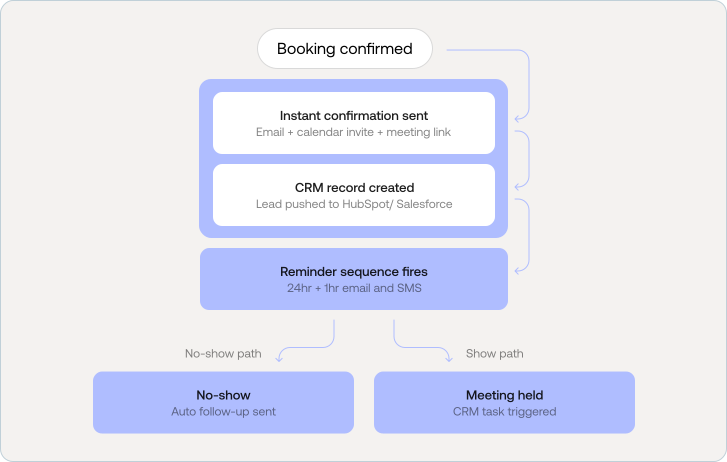
What happens after someone books?
Most booking website guides stop at the confirmation screen. But what happens next is equally important for reducing no-shows, qualifying leads, and creating a smooth experience for your team.
Instant confirmation
A confirmation email should go out immediately with a calendar invite, Zoom or Meet link (for virtual meetings), a summary of what the person booked, and clear instructions for what to prepare.
CRM record creation
For B2B, SaaS, fintech, and AI companies, the booking data should push automatically to your CRM HubSpot, Salesforce, or Airtable creating a lead record with all the intake form context attached.
Reminder sequence
Send a reminder at 24 hours and again at 1 hour before the meeting. Include the joining link in both. SMS reminders in addition to email reduce no-show rates significantly, especially for service businesses.
No-show handling
Automated no-show follow-up a short, non-aggressive email offering to reschedule recovers a meaningful percentage of missed bookings. Most booking tools support this natively.
Post-meeting task
For sales teams, the meeting should automatically trigger a follow-up task in the CRM. For service businesses, it should kick off the next step in your onboarding or job management workflow.
Booking websites for modern growth-focused businesses
B2B companies
B2B companies often need prospects to book discovery calls, demos, onboarding sessions, or consultations. A strong booking page reduces friction and helps qualified leads move faster through the funnel.
Fintech and healthtech brands
These businesses usually need a more trust-led booking experience. Clear messaging, better qualification fields, smoother UX, and stronger credibility signals improve both confidence and conversion rates.
Service companies and agencies
Agencies and service firms can use booking pages for strategy calls, audits, consultations, and onboarding. This creates a more structured sales process and reduces manual scheduling overhead.
AI-based companies
AI companies often need a flow for solution walkthroughs, proof-of-concept calls, pilot discussions, and implementation conversations. A clear booking experience helps explain the offer while qualifying interest.
SaaS companies
For SaaS businesses, booking pages often support demo requests, onboarding calls, sales qualification, implementation support, and customer success sessions. In many cases, it becomes part of the revenue journey, not just a scheduling tool.
How different business use booking websites
B2B companies
High priority
Discovery calls
Product demos
Qualification calls
Onboarding sessions
Consultations
Fintech & healthtech
Trust-led
Advisor bookings
Compliance calls
Onboarding
Trust-led demos
Platform walkthroughs
Agencies & services
Structure
Strategy calls
Audits
Discovery sessions
Proposals
Onboarding
AI-based companies
Demo-led
Product demos
Pilot discussions
POC calls
Technical walkthroughs
SaaS companies
Revenue-driven
Live demos
Onboarding calls
CS check-ins
Implementation calls
Local services
Appointment-based
Site visits
Inspections
Repair bookings
Deposits
Rescheduling
How to optimize your booking page for SEO
A booking page that nobody finds is a conversion tool that never gets used. Here are the technical and on-page optimizations that help your booking page rank and be discovered:
On-page SEO
H1 includes primary keyword plus location or use case e.g. 'Book a free Webflow strategy call for your B2B website'
Meta title under 60 characters with the keyword first e.g. 'Book a free strategy call | Buzz Interactive'
Meta description answers user intent in 155 characters including what they are booking, who it is for, and what happens next
URL slug is clean and keyword-rich use /book-a-demo or /schedule-a-call, not /page?id=123
Technical SEO
Schema markup added Service and LocalBusiness schema types enable rich results in Google
Core Web Vitals pass LCP under 2.5 seconds, CLS under 0.1. Booking widgets often slow pages down
Booking page is indexed check robots.txt and confirm the page is in Google Search Console
SSL active https required for payment collection and is a direct ranking factor
Conversion and AEO
FAQ section added with direct question-and-answer format to target featured snippets and AI Overviews
Internal links point to this page from service pages and blog posts
Conversion event tracked in GA4 set up a form_submit or booking_confirmed event
Mobile booking tested end-to-end on a real device before publishing
Booking page SEO checklist
0 of 12 completed
Pre-launch checklist for your booking website
Before publishing, test the full experience from the user's point of view:
Complete one real test booking from start to finish
Confirm reminder emails or SMS are sent correctly
Test the payment or deposit flow
Verify calendar sync is working
Test time-zone behavior for different locations
Test the full mobile booking experience
Check cancellation and rescheduling flows
Review all intake form fields
Connect Google Analytics 4 and confirm conversion tracking
Add the booking link to high-visibility places on your site navigation, hero section, and relevant service pages
Pre-launch checklist
0 of 10 completed
Final thoughts
A booking website should do more than let people pick a time slot. It should help your business convert with less friction, qualify leads before your team touches them, and create a smoother experience from first click to first conversation.
For simple needs, DIY can work. For a more polished setup without a full agency investment, a vetted freelancer can be a smart option. For B2B companies, fintech brands, healthtech platforms, AI-based companies, SaaS businesses, and service firms where scheduled interactions drive revenue, an agency-led booking website often delivers the strongest long-term value.
The best booking website is the one that matches your workflow, removes unnecessary friction, and helps the right people book faster.
FAQs
A booking website is a website or landing page that lets users schedule appointments, demos, consultations, service sessions, or onboarding calls online. It typically includes time-slot selection, intake forms, automated reminders, and sometimes payment collection.
Booking websites are useful for B2B companies, fintech and healthtech brands, service businesses including agencies, AI-based companies, SaaS businesses, consultants, clinics, and local service providers. If a scheduled interaction plays a role in your revenue or delivery model, a booking website is a practical investment.
The cost depends on whether you build it yourself, hire a freelancer, or work with an agency. DIY is usually the lowest-cost option. Freelancer projects typically run $2,000–$8,000 for a booking site. Agency-led builds range from $8,000 to $30,000 or more, depending on scope, integrations, and the complexity of the qualification flow.
Yes. You can build a booking website using a platform like Webflow or WordPress and a booking tool like Calendly or Cal.com. This works best for simple workflows and smaller budgets. For complex B2B or SaaS flows with CRM integration and lead routing, a freelancer or agency will give you a more reliable result.
A booking website should include service selection, real-time availability sync, intake forms, automated reminders, payment support where needed, mobile-friendly UX, time-zone handling, video call link generation, and integrations with your CRM and calendar tools.
No. Booking websites are equally useful for B2B companies, fintech and healthtech platforms, AI-based businesses, and SaaS brands that rely on demos, onboarding calls, consultations, or qualification calls. They are useful wherever a scheduled interaction plays a role in conversion or service delivery.
Popular options include Calendly (broad compatibility, easy setup), Chili Piper (advanced Salesforce routing for sales teams), and HubSpot Meetings (native for HubSpot users). Cal.com is a strong open-source alternative. The right choice depends on your CRM stack, team size, and whether you need lead routing logic.
A freelancer is often a good fit for smaller, clearly scoped projects. An agency is usually better when bookings affect lead generation, sales qualification, onboarding, or revenue, and you need stronger UX, SEO foundations, CRM integrations, and ongoing optimization.
The most common mistakes are: vague CTAs that don't describe the booking, too many required fields before slot selection, poor mobile experience, missing time-zone handling, no trust signals for high-consideration buyers, and no automated reminder sequence after confirmation.
Use a keyword-rich H1 and URL slug, write a direct meta description, add Service schema markup, ensure your page passes Core Web Vitals, confirm the page is indexed in Google Search Console, add a FAQ section for featured snippet eligibility, and track bookings as conversion events in GA4.
Ready to be different?
Thank you! Your submission has been received!
Oops! Something went wrong while submitting the form.





.svg "Upward index finger gesture icon")


