

We develop websites designed to convert.
Built for companies ready to scale
Fintech companies face a harder website brief than most B2B brands. Buyers expect a clear product story, but they also look for proof: security documentation, regulatory status, accurate claims and a credible path to speak with sales.
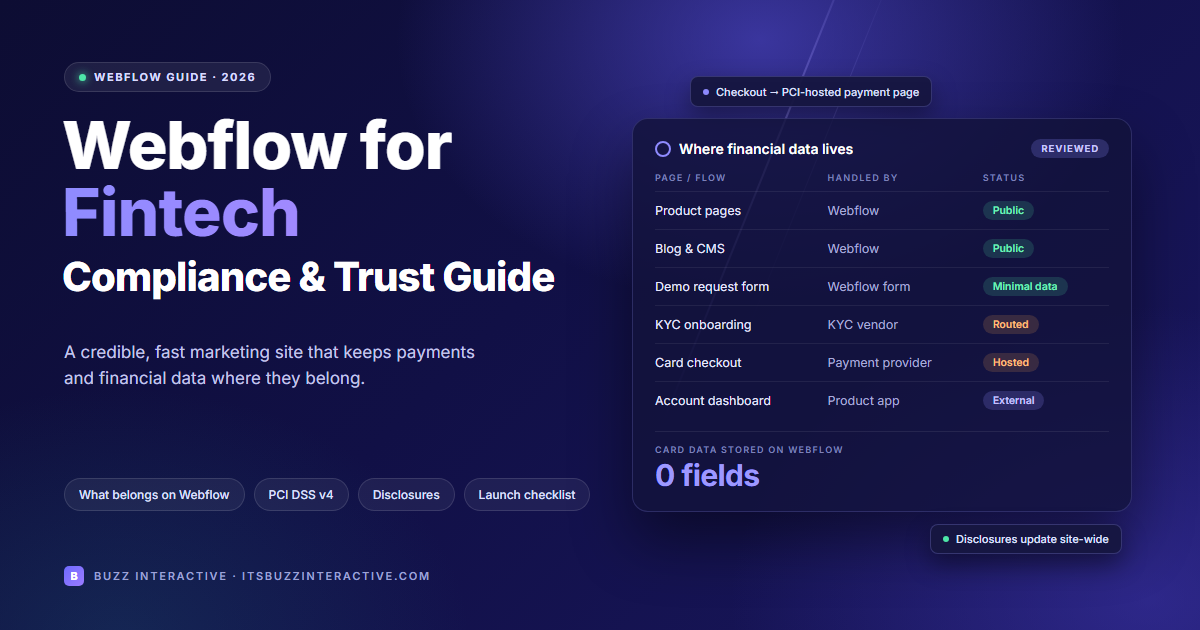
Webflow gives marketing teams the speed and design control to deliver that story without waiting on product engineering, while keeping customer accounts, payments and identity checks in separately reviewed systems.
The real work lies in drawing that boundary carefully and documenting it. That means deciding which data each form collects, which scripts run near payment flows, which disclosures every page must carry, and who approves each claim before it goes live.
At Buzz Interactive, we treat these as architecture decisions rather than launch-week fixes. Get them right early, and your Webflow site becomes a genuine asset in enterprise sales conversations, rather than a recurring risk that your compliance team has to keep reviewing.
This article is practical website architecture guidance, not legal, regulatory or PCI compliance advice. Your obligations depend on the product, jurisdictions, data flows and contracts.
A fintech website has two jobs: explain a complex product and give buyers enough evidence to trust the company.
B2B teams also need to update integration pages, launch vertical-specific campaigns and respond to procurement questions without waiting for product engineering. A component-based Webflow build can give marketing control over those public pages while keeping regulated product functions in the application stack.
This division is especially useful for payments providers, lending platforms, embedded-finance products, banking infrastructure vendors and financial SaaS. Their public site can change frequently even when their core application follows a tightly controlled release process.
An embedded widget is not automatically outside your risk boundary. Review the data it transmits, its scripts, where it is hosted, and whether the surrounding page changes payment or privacy obligations.
Our Webflow for healthcare guide offers another example of separating public pages from sensitive workflows. Healthcare and fintech have different obligations; map the boundary for your own product.
Consider a hypothetical B2B payments provider selling to finance teams. Its Webflow site presents product benefits, supported integrations, approved customer stories and a security overview.
A visitor chooses an industry page, reads an implementation case study and requests a demo through a short form asking for a work email, company and role.
The customer login opens a separate authenticated application. Identity verification, bank-account details, payment instructions and transaction history stay in reviewed product systems.
A request for security documentation follows an approved access process rather than exposing confidential reports in the public CMS.
Before launch, the team tests where form submissions, notifications and analytics events travel. Demo scheduling receives only the information needed to arrange a meeting. This example describes an architecture to assess; it does not establish compliance or report a Buzz client result.
For the meeting journey, our booking website guide covers scheduling and lead capture. Keep financial onboarding separate from that marketing journey.
Webflow publishes SOC 2 Type II and ISO/IEC 27001 information through its Trust Center. Procurement teams can request current documentation and evaluate its scope, exceptions, subcontractors and shared-responsibility controls.
Do not describe your fintech company as “SOC 2 certified” merely because a website vendor has an audit report. Confirm your own organisation’s report and scope before making any claim.
If your website takes payments, involve your payment and security teams before choosing an embed or redirect. The PCI Security Standards Council explains that SAQ A eligibility for iframe-based payment pages depends on all payment-page elements originating directly from validated third-party providers, along with other eligibility conditions. Using a hosted checkout does not remove every merchant responsibility. Avoid native Webflow forms for payment-card data.
Map personal data from every form, analytics event, chat tool, CRM integration and session-replay script. Collect only what you need; establish a lawful basis where required; provide appropriate notices; define retention and access; and review international transfers and vendor agreements.
Requirements vary by jurisdiction. In the US, financial institutions may also need to consider applicable GLBA safeguards and sector-specific rules.
For EU financial entities within scope, the Digital Operational Resilience Act introduces ICT risk and third-party governance requirements.
A Webflow marketing deployment should be assessed according to its actual role and criticality, not treated as either automatically in or automatically out of scope. Record dependencies, incident escalation, continuity expectations and contractual responsibilities with the compliance team.
Good fintech website design makes important claims easy to verify. Put a clear explanation of the product and target customer near the top of each page.
Then connect those promises to relevant evidence: named integrations, accurate product screenshots, approved customer stories, leadership information, security documentation access and clear contact details.
For enterprise buyers, create a dedicated security and compliance page. Distinguish certifications held by your organisation from those held by infrastructure vendors.
State the relevant scope and date for audit reports, avoid displaying customer logos without permission, and provide a controlled path for requesting sensitive documents. Publish a privacy notice and explain how sales-form information is used.
Trust also depends on usability: readable typography, predictable navigation, accessible forms, sensible motion, fast mobile pages and no misleading interface patterns.
A polished animation cannot compensate for vague security claims or a broken demo form.
Build the content model around the buyer journey. A CFO comparing payment providers and a developer checking API coverage need different paths through the same site. Map those journeys first, then build CMS collections to match:
Use reference and multi-reference fields to connect these collections. A buyer reading about payments orchestration should reach the relevant integration, implementation guide and security overview in one or two clicks, without searching the site.
Build the design system from reusable components and variables for colour, type and spacing. This keeps pages consistent as the marketing team publishes. It also lets one approved update, such as new disclosure wording or a revised security badge, reach every page.
Write for both search engines and answer engines:
Performance and accessibility are part of credibility. Compress images, limit heavy animations and third-party scripts, and test forms and navigation on mobile.
Finally, review every claim about speed, security or outcomes with the product and legal owners before publishing. Document who can edit and who can publish each content type, and train editors before handover so the site stays accurate after launch.
Advantages
Trade-offs
Check against the plan and architecture you intend to buy
The right choice depends on how your team works and publishes, not on features alone:
How to choose: pick the option that matches how your team creates, approves and publishes content, not just its feature list. Whichever you choose, keep regulated functions such as accounts, payments and identity checks in separately reviewed systems. None of these options makes a regulated financial product compliant by itself.
A few cells describe vendor features, so check them before publishing:
For fintech marketing, CMS limitations are often about control and scale. Map solutions, integrations, case studies and resources before selecting a plan. Forecast collection and item counts, migration volume and publishing frequency, then check the current plan against that model.
Define who can edit, review and publish each content type. Webflow offers custom roles and granular access controls on eligible Enterprise plans and partner arrangements. Editing restrictions and publishing permissions are separate controls: a locale restriction does not itself prevent a permitted publisher from publishing that locale. Test the proposed approval process with a real disclosure update.
For multilingual sites, assign owners to translations, local disclosures, URLs and metadata. Confirm the required localization features and subscription before committing. Plan how approved content will be backed up, exported and migrated if your publishing needs change.
Check Webflow plans and pricing and the linked documentation on permissions before finalizing the CMS scope.
For control details, read Webflow custom roles and locale-specific access
The Webflow agency fintech companies trust to win enterprise deals should make its process inspectable. Ask to see relevant B2B work and an explanation of the buyer journey, content model and integrations. Confirm which results are documented and which are proposed targets.
Request a delivery plan covering migration redirects, accessible forms, CRM routing, analytics review and coordination with your security owners. A credible partner should explain the boundary between public marketing content and sensitive product workflows, then demonstrate the submission journey before launch.
Compare proposals by scope, ownership and handover. Specify who owns the Webflow workspace, domain, integrations and reusable components; who approves security claims; and who maintains the site afterward. Agency rankings can help discovery, but evidence and a clear operating process should drive selection.
Use our Webflow agency comparison to build a shortlist, then assess each partner against these project requirements.
Your fintech marketing site needs a clear buyer journey and a clear boundary around sensitive workflows. Explore Buzz Interactive Webflow development services to discuss your public site, CMS structure, integrations and handover. Bring your security and compliance owners into architecture decisions early.


.svg "Upward index finger gesture icon")


