

We develop websites designed to convert.
Built for companies ready to scale
This article provides practical website architecture and content guidance. It is not legal, regulatory, accessibility, cybersecurity, or insurance-compliance advice. Requirements vary by product, state, jurisdiction, organization and data flow.
Insurance buyers rarely begin with a complete understanding of coverage. They compare unfamiliar terms, exclusions, deductibles, service models and carriers while deciding whether an agency or insurer deserves their trust. A good insurance website turns that uncertainty into a clear path: identify the visitor, explain the relevant product, answer the next question and offer an appropriate action.
Webflow gives design and marketing teams direct control over public pages without requiring product engineers to ship every wording or layout change. Reusable components can keep disclosures, calls to action and navigation consistent across personal, commercial, life, health and specialty lines. CMS collections can structure agents, locations, coverage types, articles, FAQs and case studies.
This operating model resembles the boundary described in our Webflow for fintech guide because both sectors need public education and carefully governed handoffs to sensitive systems.
The primary audience is not every visitor at once. Independent agencies often need qualified local leads and cross-sell opportunities. Brokerages may need industry-specific commercial pages and producer credibility. Carriers may need product education, agent support and regulated content governance. Insurtech teams may need enterprise messaging, integration pages and a clear route into a digital product. The information architecture should reflect the buyer, policy type, geography and sales motion.
The main benefit is speed with structure. Marketing can create an auto-insurance landing page, a contractor-focused commercial page or an agent-location page from approved components instead of rebuilding each layout. That helps teams respond to campaigns and search demand while preserving the same navigation, disclosures and brand standards.
A second benefit is clearer buyer segmentation. Instead of one generic services page, the site can route homeowners, drivers, employers, landlords, professional firms and high-value households to relevant explanations. For commercial insurance, industry pages can connect common exposures to appropriate coverage categories without promising eligibility or price.
A third benefit is ownership. The organization can manage the site, content model and reusable components inside one visual platform. That does not eliminate governance; it makes the governance decisions visible and repeatable.
An embed does not automatically move risk outside Webflow. Review the surrounding page, scripts, browser events, URLs, cookies, confirmation messages and downstream systems. A redirect to a separately hosted service can make the boundary easier to understand, but the entire journey still needs testing.
Insurance websites can touch financial, health, household and claims information. The NAIC describes a state-based privacy and security framework that includes privacy protections and data-security requirements, while the FTC explains that the Gramm-Leach-Bliley Act requires covered financial institutions, including insurance businesses, to explain information-sharing practices and safeguard sensitive data. Your obligations depend on the entity, state, product and activity.
Review the NAIC consumer privacy and security overview, the FTC privacy and security guidance, and advice from your legal and compliance owners before defining forms and integrations.
Accessibility is part of trust and access to service. Use semantic headings, keyboard-operable navigation, visible focus states, descriptive labels, sufficient contrast, useful error messages, captions and text alternatives. Test with automated tools and manual keyboard and screen-reader checks. The US Department of Justice notes that automated checks alone do not establish accessibility.
See the ADA.gov web accessibility guidance for the federal agency's overview and examples.
Content governance matters just as much as the platform. Identify who approves product descriptions, availability statements, testimonials, producer credentials, carrier references and performance claims. Record review dates and owners for pages that can become inaccurate. Do not imply that a template, hosting certificate or agency relationship makes the insurance organization compliant.
A template can accelerate the first layout, but it cannot supply your information architecture, approved claims or data-flow decisions. Webflow's marketplace currently lists insurance-oriented templates with service pages, agent profiles, appointment pages and CMS collections. Treat those elements as design starting points. Remove irrelevant sign-in, pricing or quote features rather than publishing decorative interfaces that do not connect to a real workflow.
Browse Webflow insurance templates and insurance website examples to study page patterns, then evaluate them against your brand, content, accessibility and integration requirements.
A strong page set usually includes a focused homepage; coverage or solution pages; industry pages for commercial lines; agent or advisor profiles; location pages where service is genuinely local; an educational resource center; an about page; contact and complaint routes; privacy and accessibility information; and clear links to quoting, claims and policy service.
Webflow pricing changes, so validate the current plan before purchase. The current pricing page separates site plans from higher-tier platform plans. A simple site without CMS needs differs from an insurance content program with agent profiles, coverage collections, localization, publishing workflows, granular permissions or enterprise support. Budget for the site or platform plan, workspace seats where applicable, localization, approved third-party services, migration, design and development, accessibility testing, ongoing content governance and maintenance.
Check Webflow's current pricing and feature table during procurement. Template prices are separate one-time marketplace purchases and do not include implementation, content or compliance review.
Wix can suit a small agency that wants a fast, template-led launch and expects to use built-in business tools with limited custom structure. Webflow is usually the stronger choice when the agency needs a distinctive design, reusable landing-page system, structured CMS, careful responsive behavior and a marketing team that will keep expanding the site. The better option is the one your team can govern, update and test reliably; neither platform should become the policy, claims or underwriting system by default.
Choose WordPress when the organization already has a mature WordPress team, relies on a specific plugin or publishing ecosystem, or needs an ownership model built around portable hosting. That choice brings responsibility for hosting, updates, plugins, security hardening and compatibility testing.
Choose Wix or Squarespace when a small agency needs a straightforward brochure site, modest content structure and a fast do-it-yourself workflow. Confirm that the chosen plan supports required forms, redirects, analytics, accessibility and ownership needs.
Choose a headless CMS when content must serve many front ends, brands or products; localization and governance are unusually complex; or the organization already has a product engineering team that can own the front end, APIs, preview, deployment, monitoring and security. Headless architecture can increase flexibility, but it also increases build and operational cost.
Choose a custom application or specialized insurance platform when the experience must authenticate users, calculate quotes, apply eligibility or underwriting rules, accept claims, collect sensitive documents, service policies or connect deeply to carrier and policy systems. The public marketing layer can still be Webflow if the boundary is clear.
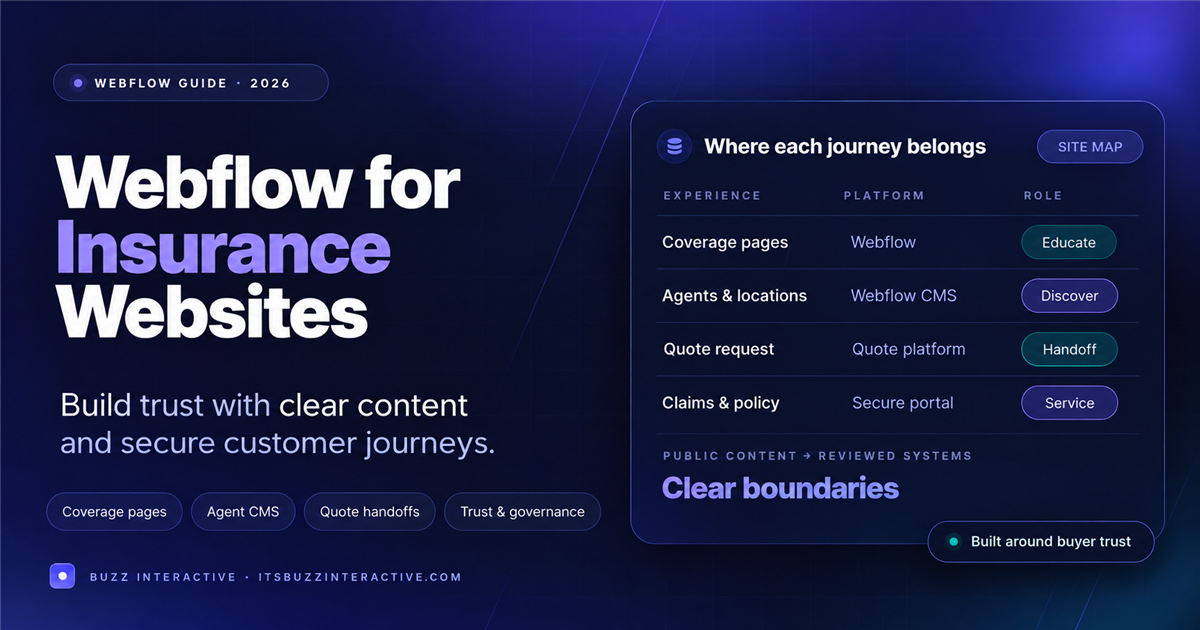
The platform decision becomes easier once the team separates public education from regulated operations. Webflow can give insurance marketers a flexible design system and structured publishing environment while quote, claims, policy and account functions stay in reviewed systems.
Buzz Interactive designs and develops Webflow sites around buyer journeys, content operations and integrations. Explore our Webflow development services or contact the team to plan an insurance website architecture.


.svg "Upward index finger gesture icon")


