

We develop websites designed to convert.
Built for companies ready to scale
A SaaS website changes with the go-to-market motion. New use cases appear, positioning shifts, sales teams uncover objections, and campaigns need dedicated landing pages. When routine updates depend on a development sprint, the website slows the work it is meant to support.
The practical question is simple: can your team make the changes it needs each week without weakening the design, measurement, or technical foundations? A well-built Webflow site can give marketing that control while keeping clear boundaries around higher-risk work.
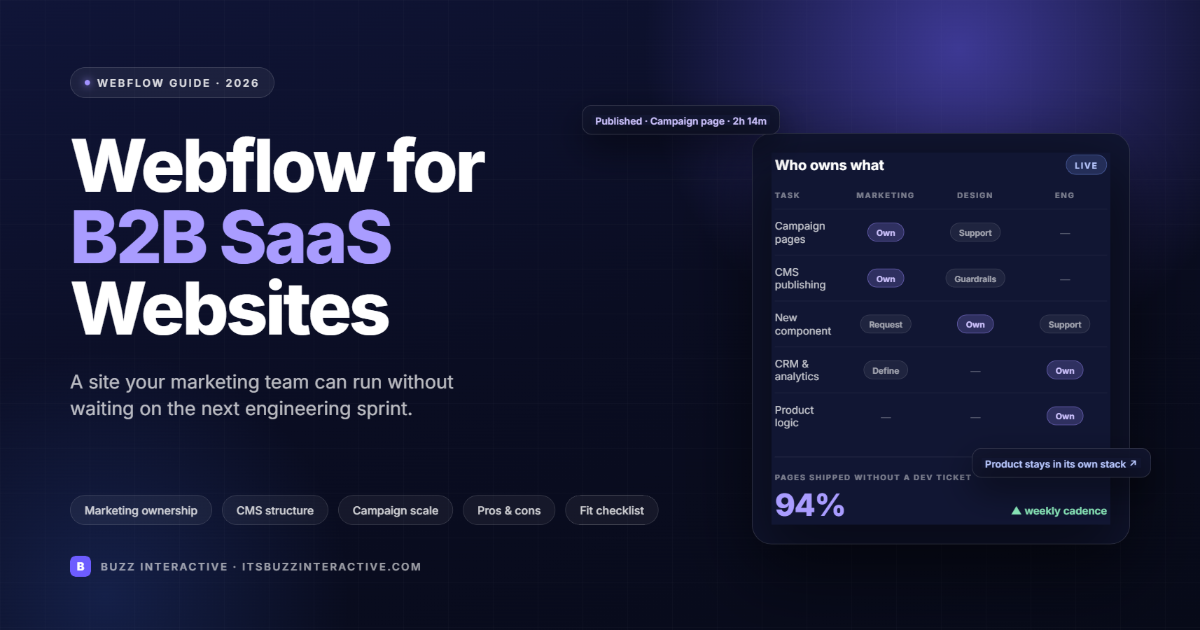
Marketing can manage copy, campaign pages, resources, customer stories, calls to action, and approved page layouts without changing the underlying design system. Webflow page building allows marketers to assemble pages from components and templates prepared by designers.
The operating model matters more than the label “no-code”. In Webflow's page building guidance, marketers work within approved building blocks. That gives them useful freedom while designers retain control of templates, components, and the visual system.
At Buzz Interactive, we plan the handover around the client's real publishing workload. We identify the pages marketing will create repeatedly, the fields editors must update, and the changes that should trigger design or engineering review. That work turns Webflow from a design file into a reliable publishing system.
Design and engineering should own changes that affect reusable components, site-wide styles, integrations, security, performance, or application behavior. Marketing autonomy loses value if every campaign introduces new classes, inconsistent tracking, or fragile custom code.
The boundary should be written into the handover. Marketing can change the message and assemble approved pages. Design maintains visual rules and extends the component library. Engineering handles custom code, data flows, complex integrations, and the SaaS product itself.
If you are looking for a webflow design for b2b brands, Contact Buzz Interactive today.
Page templates and components turn campaign production into a repeatable workflow. The team can move quickly because the decisions about layout, spacing, responsive behavior, and accessibility have already been made.
A scalable webflow for b2b websites helps buyers understand the problem, assess the product, find proof, and choose a next step. The page count matters less than whether the information supports those decisions.
Product pages should explain what the software does. Use-case and industry pages should connect those capabilities to a recognizable situation. Integration, security, pricing, comparison, and customer pages should answer the questions that appear later in the buying process. Campaign pages can then reuse that evidence instead of repeating unsupported claims.
When we review a SaaS site at Buzz Interactive, we trace the route from the first promise to the proof behind it. If a homepage claims faster implementation, the site should point to the process, integration model, customer evidence, or product detail that makes the claim credible.
The CMS should reflect the content types the company expects to publish repeatedly. Typical collections include customer stories, use cases, industries, integrations, resources, events, authors, and product updates.
Webflow defines a CMS Collection as a database for one content type whose items share a common structure. A useful schema includes the fields every entry needs, the relationships to other content, and a template that handles normal variation without one-off layout work.
For example, an integration collection may contain the integration name, category, logo, short description, supported workflows, setup link, related use cases, and call to action. Once the model is agreed, marketing can add integrations consistently and connect them to relevant product and campaign pages.
Reusable components reduce repeated design decisions and make approved patterns easier to use. A SaaS component library often covers feature explanations, proof blocks, logo groups, testimonial quotes, comparison tables, integration cards, pricing context, FAQs, forms, and calls to action.
The component set should support meaningful content variation. If every section accepts only one sentence length or one image shape, editors will work around the system. If components accept unlimited variations, the site will lose consistency. We test components with real campaign copy before handover so those limits are practical rather than theoretical.
PRSNLI is a first-party example because Buzz Interactive designed the brand identity and built the public website on Webflow, while the coaching app delivers the ongoing member experience. PRSNLI is an online personal training service that pairs each member with a certified coach. It is built for busy professionals, parents, and people who pay for gym memberships they never use, and its positioning rests on direction, motivation, and accountability rather than perfection.
The PRSNLI website then does one job: explain the offer and move visitors toward joining. The hero states the promise, six feature blocks cover the dedicated coach, progress tracking, weekly check-ins, personalized training, custom meal plans, and daily messaging, a how-it-works sequence explains the coaching model, member testimonials supply proof, and every path ends at a single call to action. Because those sections are components, the PRSNLI team can add testimonials, publish fitness articles through the CMS, and update the waitlist call to action without touching the design system.
Inside the app, members receive personalized workouts and nutrition guidance, track progress, message their coach, and adjust the plan through regular check-ins. That is authenticated, personalized, data-heavy work, and it lives in the product stack rather than in Webflow. The technology supports the relationship; it does not replace the coach.
For a SaaS team, the lesson is architectural. The marketing site should make the product easy to understand and give each audience a clear route into it. The application should handle authenticated data, personalization, messaging, tracking, and service delivery. Keeping those responsibilities clear lets each system do the work it is best suited to do.
When a brief includes logged-in workflows, billing, permissions, or customer data, treat SaaS product development as a separate technical decision. Webflow can remain the public marketing layer without carrying product logic it was not designed to manage.
Looking for the best webflow agencies for b2b websites: Contant us now.
Webflow scales campaign output only when form routing, analytics, consent, and attribution rules are defined before the team launches more pages. A landing page is operationally complete when the right team receives the lead, the important actions are measured, and the visitor gets the expected response.
Map each form to its destination, required fields, consent language, confirmation state, and follow-up owner. Define consistent events for demo requests, trial starts, pricing clicks, resource downloads, and other high-intent actions. Use one naming convention for campaign URLs and tracking parameters so reports do not split the same campaign across several labels.
At Buzz Interactive, we test this chain during handover rather than treating the form submission as the end of the website task. We confirm the live destination, check the data received by the CRM, verify the analytics event, and document who should investigate a failure. That small operating checklist prevents a fast publishing process from producing unreliable lead data.
Campaign testing creates lasting value when a winning result becomes part of the shared component or content system. Otherwise, the insight remains trapped on one landing page and future campaigns repeat the same work.
Start with a specific hypothesis and one primary conversion event. Keep the variation limited enough to explain the result, and record which audience and traffic source saw it. After the test, update the relevant component, copy guidance, or CMS field so the next page benefits automatically. If the result depends on a narrow segment, preserve it as a controlled variant rather than changing the default for everyone.
This is where marketer autonomy and design governance reinforce each other. Marketing can run experiments at campaign speed, while design and engineering review the changes that should become permanent. The site improves without accumulating disconnected page patterns.
Webflow gives B2B marketing teams speed and design control, and its limitations sit around application logic, plan-based limits, and platform lock-in. Neither side is a surprise once you understand what Webflow is built for: a visual design and publishing system for public marketing websites, not an application platform or an enterprise editorial suite. The summary below is based on what we see across B2B builds at Buzz Interactive.
Most of the disadvantages are manageable when they are known at the start. We size the CMS against plan limits, define editor permissions and review steps in the handover, and keep product logic out of the marketing site. The pros only hold up when the operating model is in place, which is why the rest of this guide focuses on that model.
The best platform is the one that matches the team's publishing model, content scale, design requirements, integrations, and technical ownership. Use the comparison below as a starting point rather than a universal ranking.
If Webflow is on the shortlist, compare the operating trade-offs in Webflow vs WordPress and Framer vs Webflow.
The strongest Webflow setup is one the marketing team can keep improving as the product, message, and campaign plan change. That requires reusable components, structured content, disciplined permissions, reliable integrations, and a clear boundary between the marketing site and product engineering.
At Buzz Interactive, our aim is to leave clients with an operating system for publishing, not a site that creates a new dependency for every copy change. If the current website is slowing campaigns or product communication, start by mapping ownership, repeatable content, technical boundaries, and the pages marketing needs to launch most often. The right platform decision becomes much clearer once that operating model is visible.
<script type="application/ld+json" data-bz-faq-schema="true">
{
"@context": "https://schema.org",
"@type": "FAQPage",
"mainEntity": [
{
"@type": "Question",
"name": "Can Marketing Run a Webflow SaaS Website Without Developers?",
"acceptedAnswer": {
"@type": "Answer",
"text": "Yes. Marketing can manage routine content, CMS publishing, campaign pages, and approved layouts when the site uses reusable components and controlled permissions. Developers should remain responsible for custom integrations, complex code, security-sensitive changes, and product functionality."
}
},
{
"@type": "Question",
"name": "Can You Build a SaaS Product on Webflow?",
"acceptedAnswer": {
"@type": "Answer",
"text": "Webflow can run the public SaaS marketing site, but a complex logged-in product usually belongs in a dedicated application stack. Use Webflow for product pages, resources, integrations, customer stories, pricing content, and campaigns. Keep authentication, billing, user data, dashboards, and real-time features in the product stack."
}
},
{
"@type": "Question",
"name": "Can Webflow Support a Large SaaS Content Library?",
"acceptedAnswer": {
"@type": "Answer",
"text": "Yes, when the CMS architecture is planned around clear content types, relationships, templates, and ownership. A large library becomes difficult when fields are inconsistent, categories overlap, or editors rely on one-off pages instead of reusable models."
}
},
{
"@type": "Question",
"name": "How Does Webflow Support Campaign Testing?",
"acceptedAnswer": {
"@type": "Answer",
"text": "Webflow can support campaign variants, landing pages, forms, analytics events, and controlled experiments. Webflow's Optimize documentation covers testing and personalization. The team still needs a clear hypothesis, enough traffic, a defined conversion event, and a process for turning a winning result into a permanent site change."
}
},
{
"@type": "Question",
"name": "Do You Need a Webflow Agency for a B2B SaaS Site?",
"acceptedAnswer": {
"@type": "Answer",
"text": "Specialist support is useful when the project includes strategy, migration, a custom design system, CMS architecture, integrations, advanced interactions, or a formal marketing handover. An experienced in-house team can operate the site once the system is established. Buzz Interactive's guide to Webflow agencies explains the partner models available. For implementation support, review our Webflow development service."
}
}
]
}
</script>


.svg "Upward index finger gesture icon")


