
Dev

10 Best Web Design Software Tools for B2B Marketing Teams in 2026

10 Best Web Design Software Tools for B2B Marketing Teams in 2026
| 4.9
Your website should be your 24/7 sales machine.

We develop websites designed to convert.

Thank you! Your submission has been received!
Oops! Something went wrong while submitting the form.

Built for companies ready to scale

Created on:
August 20, 2026
Published on:
August 25, 2026

Quick answer

Choose web design software by how quickly it turns an approved marketing idea into a measurable result.

The right platform increases marketing velocity without weakening technical confidence, governance, performance, or maintainability.

The best web design software is not simply the tool that makes a page easiest to design. It is the platform that helps your organization move from brief to design, build, approval, publication, measurement, and iteration with the least unnecessary friction.

For many B2B teams, Webflow offers the strongest balance of marketing autonomy and design control. WordPress is the more flexible open-source choice. HubSpot Content Hub fits teams that want the website close to their CRM and campaign operations. Framer favors fast, design-led launches. Contentful suits composable, engineering-led architectures. The right answer depends on your operating model.

Assessment Criteria for B2B Web Design Software

Assess every shortlisted platform against the same decision criteria:

  • Marketing velocity: How quickly can an experienced marketing team launch, change, test, and measure web experiences?
  • Marketing independence: Which routine tasks can marketing complete without engineering, design, or agency support?
  • Design flexibility: Can designers create the required experience while protecting reusable patterns and brand rules?
  • Technical confidence: Can engineering integrate, secure, optimize, maintain, scale, and eventually migrate the website?
  • Governance: Do roles, permissions, approvals, environments, and publishing controls match organizational risk?
  • Performance: Can the implementation meet realistic page-speed and Core Web Vitals requirements?
  • Integration: Can the platform connect reliably with CRM, analytics, forms, consent, personalization, and product data?
  • Scalability: Can the team operate the 500th page as safely and efficiently as the 20th page?
  • Organizational resilience: Can another qualified person take over when the original website champion leaves?
  • True cost: What will software, people, implementation, migration, maintenance, bandwidth, and delay cost over three years?

Key Features B2B Marketing Teams require in Web Design Software

Capability Minimum requirement for a B2B marketing team Why it matters Proof to request
Reusable components Approved page sections, global styles, and controlled variants Faster launches without design drift Build a campaign page from approved components
Structured CMS Reusable content types, relationships, bulk editing, and scalable publishing Supports campaigns, resources, industries, locations, and global changes Update one message across multiple page types
Roles and approvals Separate editing, design, code, review, and publishing permissions Gives marketing autonomy inside appropriate guardrails Demonstrate the exact approval path on the proposed plan
Staging and rollback Safe preview, version history, controlled release, and recovery Reduces the operational risk of frequent publishing Publish a change to staging and restore a prior version
SEO controls Metadata, canonicals, redirects, sitemaps, robots controls, schema support, and image alt text Protects discovery during routine publishing and migration Recreate the team's standard SEO workflow
Forms and analytics Flexible forms, consent handling, routing, analytics, and conversion tracking Connects page activity to measurable pipeline outcomes Launch a tracked form and confirm lead routing
Experimentation Page variants, testing integrations, and reliable measurement Converts publishing speed into learning speed Create, launch, and evaluate a page variant
APIs and custom code Documented APIs, webhooks, extensions, and controlled custom code Prevents marketing autonomy from blocking complex requirements Connect one real marketing-stack integration
Performance controls Asset optimization, script control, caching, responsive images, and bandwidth visibility Protects user experience, search performance, and operating cost Test a representative page with the planned integrations
Portability Exportable content, documented migration paths, redirect control, and data access Reduces vendor lock-in and future switching risk Export a representative content set before purchase
Collaboration Concurrent editing, comments, assignments, and clear ownership Reduces handoff delays across marketing, design, and engineering Run one campaign review with the actual buying team
Localization and scale Locale workflows, shared components, permissions, and plan limits that match growth Prevents a future rebuild when the site expands Model the expected page, locale, editor, and traffic volume

Best Web Design Software by Use Case

Use case Best-fit option to investigate first Why it belongs on the shortlist
Hybrid B2B marketing, design, and engineering team Webflow Marketers can build with approved components while designers retain system control
Open-source flexibility and portability WordPress Broad extensibility, exportable content, and control over hosting and implementation
CRM-centered demand generation HubSpot Content Hub Website pages, landing pages, testing, reporting, and CRM data can share one ecosystem
Fast design-led campaign sites Framer Visual design, CMS editing, staging, and publishing sit in a compact workflow
Composable enterprise architecture Contentful Structured content, APIs, environments, and granular roles support complex digital estates
Managed visual development with broad business features Wix Studio Visual building, CMS controls, custom roles, and developer tooling share one managed platform
Agency and multi-site production Duda Team workflows, client collaboration, reusable systems, and site fleet management are central
Commerce-first websites Shopify Commerce operations, theme sections, app blocks, and merchant editing are deeply integrated
Simple, polished company websites Squarespace A lower learning curve and managed hosting reduce initial operational overhead
Design-to-publish experimentation Figma Sites Designers can move from shared design files to published sites, but the product remains a newer option

These are conditional recommendations, not a universal ranking. A tool can be excellent for a five-person SaaS marketing team and a poor fit for a global site with hundreds of editors, regulated approval workflows, and product-data dependencies.

Why Most Web Design Software Comparisons Miss the Real Decision

Most web design software lists compare templates, AI features, drag-and-drop editors, price, and ease of use. Those factors matter, but they do not explain how the website will operate inside a company.

The real workflow is longer:

Idea -> brief -> copy -> design -> build -> review -> approval -> publish -> measure -> iterate

A website operating workflow for executive evaluation

Every platform must support the complete operating loop

  1. 1 Approved idea Brief, owner, outcome
  2. 2 Build Page, content, tracking
  3. 3 Review Brand, legal, technical
  4. 4 Publish Release with controls
  5. 5 Verify QA, analytics, consent
  6. 6 Measure Outcome and friction
  7. 7 Iterate Apply learning

Decision rule

Score the workflow, handoffs, evidence, and recovery path. Do not score the page builder alone.

Every wait state between those steps creates organizational latency. A landing page that takes two hours to build may still take four days to launch if it waits for engineering, QA, legal, and deployment. Another platform may take five hours to assemble but let the marketing team review, publish, and measure it on the same day.

That is why choosing website design software is an operating-model decision. You are deciding who owns the website, which changes require developers, how brand rules are protected, how experiments are launched, and how much technical debt the team is willing to carry.

What CMOs Actually need from a Web Platform

A CMO needs a platform that improves marketing throughput, protects the company from operational risk, and produces evidence the buying committee can defend. Ease of use matters only when it improves the complete path from an approved idea to a measurable result.

Can the Marketing Team move Faster without Creating a Control Problem?

The answer depends on which tasks become self-service and which guardrails remain in place. Marketing should usually be able to create approved pages, update content and metadata, connect standard forms, publish within policy, and iterate on campaigns. Design and engineering should retain control over the component system, complex code, security-sensitive integrations, performance standards, and architectural changes.

Ask the shortlisted vendor to demonstrate this division of responsibility in the proposed plan. A general claim about ease of use is not enough. The demonstration should show permissions, review, approval, publishing, rollback, and the audit trail around a representative campaign page.

Will the Platform Improve Revenue Execution or only Page-Production Speed?

Sales and marketing value comes from faster learning, not simply faster publishing. A platform should help the team create an ICP-specific page, route the right form submission, preserve attribution, measure conversion, launch a controlled variant, and apply the result to the next iteration. If the page launches quickly but the CRM, consent, analytics, or experiment workflow breaks, the organization has not shortened Idea-to-Impact Time.

What Risks must the CMO Approve?

The recommendation should identify at least five residual risks: vendor lock-in, specialist dependency, governance gaps, integration ownership, and three-year operating cost. It should also explain what happens if the website champion leaves, the site grows to hundreds of pages, a global claim changes, an integration fails, or the company needs to migrate.

What Evidence should Accompany the Recommendation?

The CMO should receive a two- or three-platform shortlist, agreed scoring weights, pass-or-fail requirements, a common workflow test, evidence-confidence grades, a three-year cost model, rejected alternatives, and the conditions under which the recommendation would change. This turns the platform choice from preference into an auditable business decision.

What the Delivery and Revenue Teams need to Validate

Developer and Engineering Questions

  • Architecture: What is rendered where, who controls deployment, and which platform services are mandatory?
  • Extensibility: Which APIs, webhooks, SDKs, server-side options, and custom-code boundaries exist on the proposed plan?
  • Environments: How are development, staging, preview, production, rollback, and secrets handled?
  • Data and integrations: Who owns failures, rate limits, retries, monitoring, authentication, and schema changes?
  • Performance: Can the team control scripts, fonts, images, caching, redirects, and third-party code well enough to meet its targets?
  • Security and portability: Which SSO, access, audit, export, hosting, compliance, and migration requirements are supported?

The developer should not ask only whether a feature exists. The better question is whether the feature can be operated, monitored, changed, and transferred by the team that will own it.

Designer Questions

  • Can the design team create reusable components, variants, tokens, global styles, and responsive rules?
  • Can marketers use those components without changing protected structure or introducing inaccessible patterns?
  • How are design review, content review, comments, approvals, and exceptions handled?
  • What happens when a global brand rule or claim changes across hundreds of pages?
  • Can a new designer understand the component and content systems without reverse-engineering one person's conventions?

Design flexibility is valuable only when it produces a system that remains consistent after launch. The recommendation should therefore distinguish creative freedom for system designers from safe flexibility for daily editors.

Sales and Revenue-Team Questions

  • Can marketing produce segment, account, industry, and campaign pages quickly enough to support active sales motions?
  • Can forms route leads correctly, preserve source data, enrich records, and trigger the agreed follow-up process?
  • Can sales proof, pricing language, claims, and calls to action be updated globally when the offer changes?
  • Can regional teams localize content without creating conflicting versions or broken analytics?
  • Can the team connect page performance to pipeline outcomes instead of reporting visits alone?

Sales should influence the primary workflows and measurement requirements. It should not select the platform based on a demo, a template library, or a preference for one CRM screen.

Copywriter and Content-Team Questions

  • Can writers draft, preview, review, and schedule content without changing layout rules?
  • Does the CMS support reusable proof, offers, authors, industries, products, resources, and calls to action as structured content?
  • Can one approved claim be updated everywhere it appears without manual page-by-page editing?
  • Are metadata, canonicals, redirects, image alt text, internal links, and schema fields available to the right roles?
  • Does the workflow preserve version history, ownership, and the source of approved language?

The content system should reduce repeated writing and editing work while protecting accuracy. Reusable content creates value when it shortens updates, prevents conflicting claims, and makes review easier.

Analyst and Experimentation Questions

  • Is there a documented event and data-layer model?
  • Can the team verify consent, source attribution, form completion, CRM receipt, and downstream reporting?
  • How are variants allocated, measured, stopped, and selected?
  • Can analysts distinguish a publishing failure from a tracking failure?
  • Are data ownership, retention, export, and vendor dependencies acceptable?

An experiment is not complete when a variant is published. It is complete when the team can trust the measurement, interpret the result, and apply the learning.

QA Questions

QA should validate the exact release path, not a vendor-controlled demo. Test responsive behavior, supported browsers, keyboard access, screen-reader structure, forms, validation, error handling, analytics, consent, redirects, metadata, schema, performance, rollback, and permissions. Record the expected result, actual result, dependency, workaround, and business impact for every failure.

What is Idea-to-Impact Time?

Idea-to-Impact Time is the period between approval of a marketing idea and the first point at which the team can measure its results. It captures the complete execution path, not just design or development time.

An illustrative comparison makes the difference clear:

Workflow stage Platform A Platform B
Design and build 2 hours 5 hours
Developer review 2 days Not required for an approved component-based page
QA and approval 1 day 2 hours
Deployment 1 day 15 minutes
Approximate launch time 4 days Less than 1 day

This is an example, not a benchmark. Your actual time will depend on team skills, page complexity, integrations, legal review, and governance rules. Measure the same workflow in each shortlisted platform before buying.

The Idea-to-Impact Framework

The Idea-to-Impact Framework evaluates the system around the software. It uses two primary dimensions and three supporting checks.

1. Marketing Velocity

Marketing Velocity measures how quickly an experienced team can repeatedly create, launch, change, test, measure, and improve web experiences.

Evaluate:

  • Landing-page creation
  • Content and SEO editing
  • Form and analytics setup
  • Experiment creation
  • Publishing and rollback
  • Localization and campaign duplication
  • Global updates through reusable content or components

Do not confuse fast to learn with fast to operate. A simple builder may deliver a quick first page but become slow when the site reaches 500 pages. A more technical platform may take longer to learn but support faster repeatable work after the system is established.

How to Calculate the Marketing Velocity Score

Use a fixed set of representative tasks and score the complete workflow, including wait states. The score should combine page creation, routine change, experiment launch, global update, and measurement readiness.

Score Marketing Velocity interpretation Evidence required
0 The required workflow cannot be completed Documented product or plan limitation
1 The workflow depends on a rebuild, unsupported workaround, or several specialist handoffs Recorded failed test and dependency log
2 The workflow works but repeatedly enters design, engineering, agency, or administrator queues Timed workflow with recurring dependencies
3 An experienced team can complete normal work with manageable review and occasional specialist help Representative test with owners and wait states
4 The operating team completes most routine work quickly inside clear guardrails Successful test, verified analytics, and rollback
5 The complete workflow is repeatable, measurable, governed, and resilient under the buyer's real conditions Several Grade A tests on the proposed plan

Do not convert a vendor demo into a score of 5. Record both active work time and elapsed time. A page that requires one hour of editing and three days of waiting has a three-day organizational cycle time.

2. Technical Confidence

Technical Confidence measures whether design and engineering can support the site without accepting unacceptable risk.

Validate:

  • Architecture, hosting, and deployment model
  • CMS structure and content relationships
  • APIs, webhooks, custom code, and integrations
  • Performance controls and Core Web Vitals
  • Roles, permissions, approvals, and auditability
  • Environments, staging, backups, and rollback
  • Security and enterprise requirements
  • Export options, migration effort, and vendor lock-in

Marketing autonomy is not automatically good. If speed creates broken design patterns, uncontrolled scripts, weak permissions, or a site nobody can maintain, the organization has only moved the bottleneck into the future.

How to Calculate the Technical Confidence Score

Score the architecture that will actually be implemented, not the theoretical maximum of the product. Review the proposed hosting, frontend, CMS model, integrations, permissions, release process, monitoring, maintenance owner, and exit path.

Score Technical Confidence interpretation Evidence required
0 A non-negotiable architecture, security, integration, or portability requirement cannot be met Confirmed limitation
1 The requirement needs an unsupported or unacceptable workaround Architecture review and risk record
2 Material risk remains in performance, governance, maintenance, security, or migration Documentation plus unresolved proof request
3 Common requirements are supportable with documented trade-offs and named owners Reviewed design and operating plan
4 The implementation is maintainable, observable, governed, and scalable for the expected use case Technical validation in the proposed plan
5 The implementation has strong controls, recovery, documentation, portability, and tested ownership transfer Grade A technical and resilience evidence

Technical Confidence is not a score for how much code a platform permits. It measures whether the team can support the chosen implementation safely over time.

3. Marketing Independence

Marketing Independence is the percentage of routine work marketing can complete without engineering help. Score common tasks such as page creation, copy changes, metadata, forms, redirects, analytics, publishing, experiments, and personalization.

A higher score is useful only when the platform also provides appropriate guardrails. The goal is the right dependency, not zero dependency.

4. Organizational Resilience

Organizational Resilience asks a blunt question: if the person who built the website leaves tomorrow, can another qualified person take over?

Check documentation, component naming, CMS models, permissions, integration records, deployment steps, custom-code ownership, and onboarding time. A site that depends on one expert is an operational risk regardless of the software used.

5. True Cost of Website Execution

The true cost is larger than the subscription:

Software + hosting + add-ons + implementation + developer time + design time + content operations + agency support + migration + training + maintenance + delay

A lower monthly fee can produce a higher total cost if marketers need a developer for every campaign change. An expensive platform can also be wasteful if the team never uses its governance, localization, experimentation, or integration capabilities.

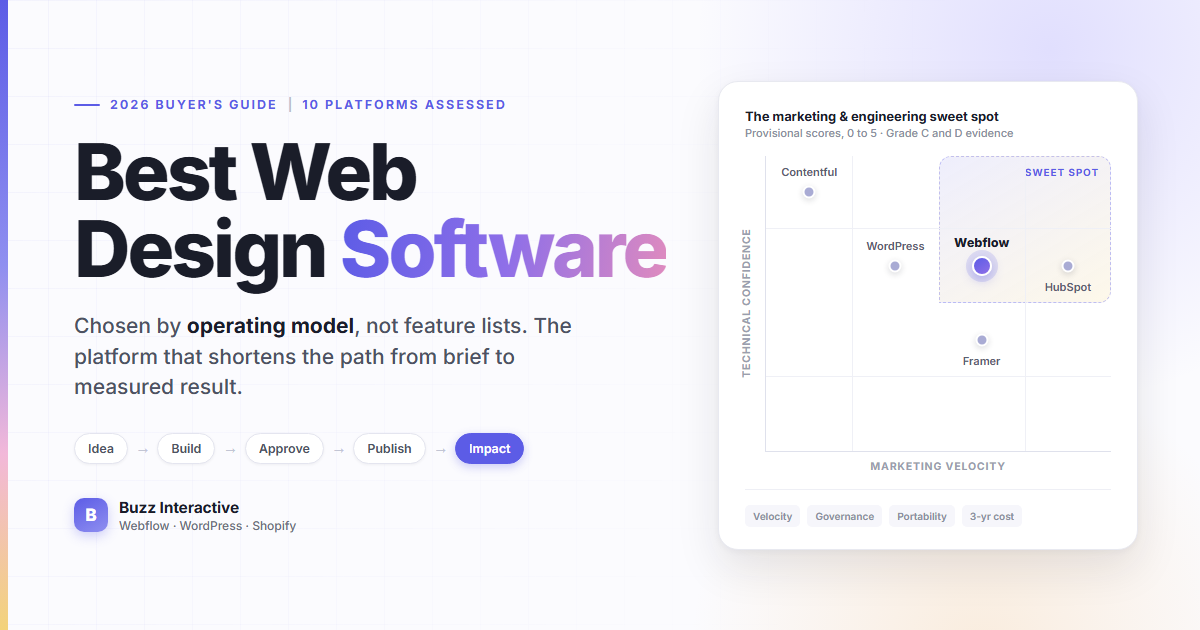
The Marketing and Engineering Sweet Spot

Two axes reveal the operating model behind a platform choice

Technical confidence
High Low
Marketing-led Fast publishing Guardrails required
High-performing autonomy Fast publishing Strong controls
Fragile autonomy Speed without resilience Champion risk
Engineering-led Strong foundation Specialist dependency
Low Marketing independence High

Do not place a platform in one quadrant based on its product category. The same WordPress installation can be a sweet spot or a maintenance burden. The same Webflow site can empower marketing or lock routine changes behind one designer. Architecture, implementation quality, plan level, permissions, and team skills change the result.

Five Real-World Tests every Platform should Pass

Run the same scenario, content, tester profile, plan level, integrations, and success criteria for every candidate. Record active time, elapsed time, people involved, approvals, failures, workarounds, and the evidence needed to verify completion.

1. The Campaign Launch Test

  • Scenario: The CMO wants a landing page for a new campaign live by Friday.
  • Complete: Assemble approved components, add copy and assets, connect the form, apply metadata, configure analytics and consent, review, approve, publish, and verify the live result.
  • Record: Who touched the page, which permissions were needed, how long work and waiting took, and whether the result reached the CRM and analytics correctly.
  • Good result: Marketing completes the routine work while design and engineering controls remain intact.
  • Red flag: The demo skips lead routing, analytics verification, accessibility, approval, or the actual publishing role.

2. The Underperforming Campaign Test

  • Scenario: The page is live, but conversion is below the agreed target.
  • Complete: Change the offer, create a controlled variant, preserve attribution, review the change, launch it, and confirm measurement.
  • Record: Whether engineering is required, how variants are governed, and how the team decides that a result is valid.
  • Good result: The team moves from insight to a measurable iteration without duplicating fragile pages or losing data quality.
  • Red flag: The platform can duplicate a page but cannot support trustworthy allocation, reporting, or rollback.

3. The new ICP Test

  • Scenario: Sales identifies a high-value segment that needs dedicated messaging and proof.
  • Complete: Create an ICP-specific page, relevant proof, calls to action, forms, routing, metadata, and reporting.
  • Record: Which content is reusable, which data is segment-specific, and how sales will know the page is contributing to pipeline.
  • Good result: Marketing can launch a governed segment experience without creating a separate unmaintainable mini-site.
  • Red flag: Every new audience requires a developer-built template, copied analytics, or manual lead-routing rules.

4. The Global Messaging-Change Test

  • Scenario: The company's positioning, product name, claim, or legal language changes.
  • Complete: Update the approved content across 50, 100, or 500 relevant pages, preview the impact, obtain approval, publish, and verify exceptions.
  • Record: Whether the content is structured or duplicated, how affected pages are discovered, and how regional or product exceptions are controlled.
  • Good result: One governed update changes the right places without overwriting valid exceptions.
  • Red flag: The team must search and edit pages manually or cannot prove where the old claim remains.

5. The Developer-Dependency Test

  • Scenario: Marketing requests five routine changes during one week.
  • Complete: Recreate a headline change, CTA addition, landing page, navigation update, metadata update, form or analytics change, and one new component request.
  • Record: Which tasks require marketing, design, engineering, an administrator, or an agency, plus the reason for every dependency.
  • Good result: Routine work stays with the operating team, while new patterns and technical changes follow an intentional specialist process.
  • Red flag: Marketing appears independent only because it has unrestricted access to code, styles, integrations, or production controls.

A repeatable benchmark for time, friction, dependency, and proof

Run the identical scenario in every proposed account and plan

  1. 1 Brief ready Marketing
  2. 2 Page built Builder
  3. 3 Controls checked Design and legal
  4. 4 Published Publisher
  5. 5 Analytics verified Analyst
  • Timer Start and stop condition
  • Friction Expected versus actual
  • Dependency Permission or specialist
  • Evidence Recording and output

Original Benchmark Status

The common test protocol is complete, but logged-in timings are not. Account access, plan entitlements, sample content, integrations, tester skill, and governance settings materially change the result. The research appendix provides identical start and stop conditions, a time-to-change worksheet, and a friction log so Grade A evidence can be collected without changing the methodology.

How this Comparison was Researched

This guide's product evidence was checked on August 13, 2026, and expanded on August 18, 2026. Research included the 13 supplied competing URLs, current first-party documentation, G2 review patterns, and recent practitioner discussions. Official documentation supports capability claims. Independent and practitioner sources identify recurring trade-offs and validation questions rather than universal conclusions.

Evidence boundary: Public-evidence platform sheets and provisional 0-to-5 scores are now included. They carry Grade C or D confidence because logged-in, account-level workflow benchmarks were not conducted across all ten platforms. No unmeasured task time is presented as an original result. Before purchase, replace provisional scores with Grade A evidence from the five workflow tests under the proposed plan, integrations, roles, content, and governance controls.

Source order: First-party documentation comes first for factual capabilities. Independent reviews are used for repeated experience patterns. Practitioner discussions are used for edge cases and operational questions. Customer case studies are treated as customer-reported outcomes, not independent proof.

The market gap is clear. Several leading comparison pages still emphasize ease of use, visual editors, templates, AI, pricing, and generic best-for labels. Even more structured evaluations tend to score product capabilities rather than the full organizational path from campaign request to measured result. This guide evaluates both the product and the way the team will work around it.

1. Webflow: Best for Hybrid B2B Marketing Teams

Decision factor Assessment
Best for High-output B2B marketing sites that need design-system guardrails
Marketing velocity High after the component system, permissions, and integrations are established
Marketing independence 4/5, provisional public-evidence score
Technical confidence 4/5, provisional public-evidence score
Developer dependency Low for routine pages; medium for integrations and custom behavior
Design flexibility Excellent visual control with reusable components and responsive systems
Governance Strong roles and publishing separation, especially on advanced plans
Performance Strong hosted baseline; scripts, media, integrations, and plan limits still require testing
Integrations Broad marketing integrations plus APIs and custom-code options within platform boundaries
Scalability Strong for governed marketing sites; validate CMS, localization, editor, and traffic limits
Portability Medium; exported code excludes several hosted capabilities
Organizational resilience Strong when components, naming, permissions, and integrations are documented
TCO predictability Medium because workspaces, seats, localization, bandwidth, and implementation affect cost
Biggest advantage Marketing can assemble pages without changing underlying design rules
Biggest limitation Migration does not reproduce every hosted CMS, form, search, localization, or component capability
Best operating model Hybrid
Who should choose it B2B teams that publish frequently and want marketers to assemble pages inside designer-controlled components
Who should avoid it Mandatory self-hosting, unusual server-side logic, or complete hosted-feature portability
What we discovered G2 review themes praise flexibility and deployment speed while noting learning curve, missing features, and cost
Evidence Grade C; direct workflow benchmark still required

Webflow separates page building from design-system control. Designers can create approved components and templates, while marketers use the documented page-building workflow o launch pages without editing underlying classes.

Advanced site roles and permissions can separate design, content, review, and publishing responsibilities. The main trade-off is portability: Webflow explains that exported code excludes several hosted capabilities, so migration should be planned as a rebuild rather than a one-click transfer.

Choose Webflow when frequent launches and design quality both matter.

Test carefully when the site requires complex server-side logic, unusual data relationships, or mandatory self-hosting. Buzz Interactive provides Webflow design and development for this hybrid operating model.

2. WordPress: Best for Open-Source Control and Extensibility

Decision factor Assessment
Best for Organizations that value hosting choice, extensibility, and content portability
Marketing velocity Medium to high, depending on the block system, plugins, hosting, governance, and release process
Marketing independence 3/5, provisional public-evidence score
Technical confidence 4/5, provisional public-evidence score
Developer dependency Low to high, depending on theme, plugins, governance, hosting, and release process
Design flexibility Excellent, with almost unlimited theme, block, plugin, and custom-code options
Governance Variable; roles are native, while approvals and guardrails depend on implementation
Performance Variable; hosting, theme, plugins, caching, media, and maintenance determine the result
Integrations Excellent ecosystem plus APIs and custom-development options
Scalability High with appropriate architecture and operations
Portability High for content, code, hosting choice, and migration paths
Organizational resilience Strong only when plugin policy, deployment, documentation, and maintenance ownership are explicit
TCO predictability Low to medium because maintenance, plugins, agencies, and technical debt vary widely
Biggest advantage Control over hosting, code, integrations, and migration paths
Biggest limitation Maintenance and security discipline remain the organization's responsibility
Best operating model Hybrid or engineering-owned
Who should choose it Organizations that need hosting choice, broad extensibility, content portability, and an explicitly owned maintenance model
Who should avoid it Teams without a clear owner for updates, backups, security, plugin policy, and performance
What we discovered G2 review themes praise ease and flexibility while noting plugin, security, and advanced-customization issues
Evidence Grade D because implementation quality dominates

WordPress is not one operating model. A controlled custom block system can give marketers safe page building, while an unmanaged collection of plugins and unrestricted admin access can create fragile dependencies.

WordPress documents six default roles and capabilities, a broad REST API, and native content export. These capabilities support portability and customization, but marketing speed still depends on the quality of the theme, blocks, plugin policy, hosting, and maintenance process.

Choose WordPress when open-source control, custom integrations, or publishing depth outweigh the appeal of one managed vendor.

Test carefully when nobody clearly owns updates, backups, plugin review, security, and performance. Buzz offers custom WordPress development built around modular systems and maintainable governance.

3. HubSpot Content Hub: Best for CRM-Centered Demand Generation

Decision factor Assessment
Best for B2B teams that want website execution close to CRM and campaign operations
Marketing velocity High for campaign teams working inside the HubSpot CRM and marketing ecosystem
Marketing independence 5/5, provisional public-evidence score
Technical confidence 4/5, provisional public-evidence score
Developer dependency Low for routine campaigns; medium for custom modules, themes, and architecture
Design flexibility Good inside themes and modules; highly distinctive systems need developer preparation
Governance Strong on qualifying plans, including granular content permissions and approvals
Performance Strong managed baseline; custom assets, scripts, and modules still need validation
Integrations Excellent when HubSpot CRM, forms, automation, testing, and reporting are central
Scalability Strong for enterprise content and demand-generation operations, subject to plan entitlements
Portability Low to medium because platform-specific modules, CRM logic, and workflows require migration planning
Organizational resilience Strong when themes, modules, workflows, and CRM dependencies are documented
TCO predictability Medium; higher-tier controls, seats, hubs, and onboarding can increase cost
Biggest advantage Pages, forms, CRM data, automation, testing, and reporting share one ecosystem
Biggest limitation Platform concentration and higher-tier requirements can increase total cost
Best operating model Marketing-owned or hybrid
Who should choose it Demand-generation teams that want pages, forms, CRM data, reporting, and campaign operations in one ecosystem
Who should avoid it Broad hosting control, highly custom frontend architecture, or a low-cost exit path
What we discovered G2 review patterns praise centralized publishing and CRM alignment while noting learning complexity and advanced-feature cost
Evidence Grade C and plan-dependent

HubSpot can remove integration steps when the CMS, forms, CRM, automation, and reporting already share the same operational system. HubSpot documents A/B testing for pages (), including performance comparison and winner selection.

Permissions separate view, edit, and publish access. Content approvals are available under specified Enterprise subscriptions. Developers can package modules, templates, CSS, JavaScript, and fields into reusable HubSpot themes.

Choose HubSpot when reducing friction between the website and HubSpot-powered demand generation creates measurable operational value.

Test carefully when the team needs broad hosting control, a highly custom frontend, or a lower-cost exit path.

4. Framer: Best for Fast, Design-Led Campaign Sites

Decision factor Assessment
Best for Design-led brand, startup, product-launch, and campaign sites
Marketing velocity High for design-led campaign sites and visually distinctive launches
Marketing independence 4/5, provisional public-evidence score
Technical confidence 3/5, provisional public-evidence score
Developer dependency Low for design and content; higher for complex backend or content requirements
Design flexibility Excellent for visually ambitious responsive marketing pages
Governance Good and improving, with roles, staging, and deployment controls
Performance Strong for conventional marketing sites; larger projects and custom code require testing
Integrations Good for common marketing tools, with limits around complex application behavior
Scalability Medium; validate CMS collections, localization, editors, redirects, and page volume
Portability Low to medium because production output and CMS workflows are platform-bound
Organizational resilience Medium; success depends on clear component, CMS, and handover practices
TCO predictability Medium; plan and CMS limits can change the required tier
Biggest advantage Design and production publishing operate in one compact environment
Biggest limitation Complex content, workflow, and application requirements need careful validation
Best operating model Design-owned or hybrid
Who should choose it Design-led teams that value rapid visual production and can validate CMS, integration, and portability limits
Who should avoid it Large structured-content estates, complex applications, or strict portability requirements
What we discovered G2 review themes emphasize speed; CMS discussion raises concerns about very large content estates
Evidence Grade D

Framer compresses design and publishing into one environment. Its roles and permissions can separate Design, Content, and Deploy access on qualifying plans.

On-page editing allows collaborators to update text, images, component properties, CMS content, and SEO fields without full design access. Staging and version controls support review, deployment, and rollback.

Choose Framer when the website is design-led, campaign-heavy, and operationally straightforward.

Test carefully when the site needs complex content relationships, mature enterprise workflows, or application-like backend logic.

5. Contentful: Best for Composable Enterprise Architecture

Decision factor Assessment
Best for Structured content delivered across websites, applications, regions, and channels
Marketing velocity Medium for editors, but lower for new page patterns unless a suitable visual frontend is provided
Marketing independence 2/5, provisional public-evidence score
Technical confidence 5/5, provisional public-evidence score
Developer dependency High for frontend patterns, deployment, and new experience development
Design flexibility Excellent through the chosen frontend, but not supplied by the CMS alone
Governance Excellent environments, roles, content modeling, and enterprise controls
Performance Strong potential, but the frontend architecture and delivery layer determine outcomes
Integrations Excellent API-first integration and composable architecture
Scalability Excellent for multi-channel, multi-region, and structured-content operations
Portability High for content and models; frontend, apps, workflows, and history migrate separately
Organizational resilience Strong when models, environments, frontend components, and deployment are documented
TCO predictability Low to medium because frontend, cloud, integration, and specialist costs are separate
Biggest advantage Structured content and APIs remain independent from the presentation layer
Biggest limitation Marketing autonomy depends on a separate frontend and component system
Best operating model Engineering-owned or hybrid
Who should choose it Enterprises that need structured content across products, websites, applications, locales, or channels
Who should avoid it Small teams that must independently design and publish new layouts
What we discovered G2 review themes praise APIs and scale while noting complexity, cost, and learning curve
Evidence Grade C and frontend-dependent

Contentful is a headless content platform rather than an all-in-one visual builder. Marketing can manage structured content, but designers and engineers normally own the frontend experience.

Environments isolate content and model changes across development, QA, and production. Granular environment permissions can control editor access. Content and models are also exportable through the CLI, although workflows, apps, history, and credentials may require separate migration work.

Choose Contentful when multi-channel content, composable architecture, and engineering control are core requirements.

Test carefully when a small marketing team must independently design and publish new layouts.

6. Wix Studio: Best for Managed Visual Development

Decision factor Assessment
Best for Teams wanting visual building, CMS, collaboration, and managed infrastructure
Marketing velocity High for managed visual production when the required workflows fit the platform
Marketing independence 4/5, provisional public-evidence score
Technical confidence 3/5, provisional public-evidence score
Developer dependency Low for routine work; medium for advanced integrations and custom logic
Design flexibility Strong responsive visual and animation controls
Governance Strong role and CMS controls, with complex staging requirements needing validation
Performance Acceptable managed baseline; larger projects and editor performance need testing
Integrations Broad app and developer ecosystem, with individual integration quality varying
Scalability Good for many business sites; validate complex CMS, logs, environments, and enterprise requirements
Portability Low because Wix sites remain on Wix infrastructure
Organizational resilience Medium; managed infrastructure helps, while proprietary implementation increases platform dependency
TCO predictability Medium; plan tiers, apps, seats, and business tools affect cost
Biggest advantage Broad business capabilities share one managed platform
Biggest limitation Wix sites cannot be exported for hosting on another infrastructure
Best operating model Marketing-owned or hybrid
Who should choose it Teams and agencies that want visual building, managed hosting, business features, and controlled contributor access
Who should avoid it Mandatory self-hosting, source portability, or complex enterprise staging and reporting
What we discovered G2 review themes praise usability and responsive design while noting performance, staging, integration, and plan concerns
Evidence Grade D

Wix Studio supports workspace and site-level roles, external collaborators, and real-time editing. Its team management documentation explains scoped access, while custom CMS permissions separate content and collection responsibilities.

The managed infrastructure reduces hosting and update work. The strategic trade-off is portability: Wix states that a Wix site must run on Wix infrastructure.

Choose Wix Studio when the organization values an all-in-one managed platform and accepts proprietary hosting. Test carefully when self-hosting, source portability, or a future move to another frontend stack is likely.

7. Duda: Best for Agencies and Repeatable Multi-Site Delivery

Decision factor Assessment
Best for Agencies, franchises, and teams producing multiple sites from repeatable systems
Marketing velocity High for standardized multi-site and agency delivery workflows
Marketing independence 4/5, provisional public-evidence score
Technical confidence 3/5, provisional public-evidence score
Developer dependency Low to medium, depending on custom requirements
Design flexibility Good for repeatable managed sites, with limits for bespoke applications
Governance Strong client and team workflows, subject to account and site-access design
Performance Good managed baseline; widgets, integrations, and custom code need testing
Integrations Moderate; practitioner reviews repeatedly request broader third-party integration depth
Scalability Excellent for site fleets and repeatable delivery
Portability Low to medium; validate export and rebuild scope
Organizational resilience Strong for standardized agency systems and documented client handoff
TCO predictability Strong for repeatable delivery, subject to sites, seats, and custom work
Biggest advantage Client collaboration and repeatable site operations are central
Biggest limitation Team access, custom integrations, and portability require careful validation
Best operating model Agency-owned or design-owned
Who should choose it Agencies, franchises, and multi-site operators that value repeatable production and client collaboration
Who should avoid it Deep bespoke applications, broad per-site team isolation, or mandatory self-hosting
What we discovered G2 review themes praise agency efficiency and support while noting integration and customization limits
Evidence Grade D

Duda is designed around scaled site production. Site comments place internal and client review directly on the site, reducing scattered approval conversations.

Duda supports predefined and custom permission groups. Its team member documentation notes that team members can access all sites in an account, while single-site access is generally managed through client roles.

Choose Duda when multi-site production, client review, and standardized delivery are central.

carefully when the organization needs deep per-site team isolation, bespoke backend logic, or an easy path to self-hosting.

8. Shopify: Best for Commerce-First Website Design

Decision factor Assessment
Best for Websites where catalog, checkout, merchandising, and commerce operations are primary
Marketing velocity High for commerce operations, merchandising, and store content inside the theme and app system
Marketing independence 4/5, provisional public-evidence score
Technical confidence 4/5, provisional public-evidence score
Developer dependency Low for merchant operations; medium for theme, checkout, and integration work
Design flexibility Good inside a modular theme; unusual experiences require theme or app development
Governance Strong store permissions and commerce operations
Performance Strong infrastructure, while themes, apps, pixels, and scripts can materially affect pages
Integrations Excellent commerce ecosystem and APIs
Scalability Excellent for commerce operations and international growth
Portability Medium; product data is accessible, while themes, apps, checkout, and workflows require migration work
Organizational resilience Strong when theme ownership, app policy, integrations, and merchandising roles are documented
TCO predictability Medium because app, theme, transaction, agency, and custom-development costs accumulate
Biggest advantage Commerce operations and storefront editing are deeply integrated
Biggest limitation Apps can add cost, scripts, performance burden, and operational complexity
Best operating model Hybrid or commerce-owned
Who should choose it Commerce-first businesses that need a mature operational ecosystem for products, checkout, orders, and merchandising
Who should avoid it Content-heavy B2B demand generation where commerce is secondary
What we discovered G2 review themes praise ease and integrations; a 2026 practitioner dataset illustrates the need for app and script governance
Evidence Grade D and app-stack-dependent

Shopify should lead the shortlist when commerce defines the website. Online Store 2.0 uses JSON templates, sections, dynamic sources, and app blocks. Shopify explains that sections on most pages let merchants arrange layouts while developers maintain modular themes.

Store permissions can separate theme code from blog, page, product, and merchandising responsibilities.

Choose Shopify when product, order, checkout, and merchandising operations drive the experience.

Test carefully when the website is primarily a complex B2B content and demand-generation platform. Buzz provides Shopify development for custom storefronts, integrations, and conversion work.

9. Squarespace: Best for Simple, Polished Company Websites

Decision factor Assessment
Best for Small teams needing a polished brochure, portfolio, service, or light-commerce site
Marketing velocity High for simple company sites, but lower when custom workflows or complex content models are required
Marketing independence 4/5, provisional public-evidence score
Technical confidence 3/5, provisional public-evidence score
Developer dependency Low for normal operations; higher when requirements exceed the platform model
Design flexibility Moderate; constraints favor consistency over unusual systems
Governance Moderate contributor controls with limited granular scope
Performance Strong managed baseline for simple sites
Integrations Good for common small-business needs, with workarounds for advanced requirements
Scalability Low to medium for complex content, large page estates, or distributed teams
Portability Low to medium; validate content export, redirects, integrations, and rebuild scope
Organizational resilience Good for simple sites because operations and hosting are constrained
TCO predictability Strong for straightforward sites with limited add-ons
Biggest advantage Managed hosting and constrained editing reduce operational overhead
Biggest limitation Granular permissions, structured content, and extensibility are limited
Best operating model Marketing-owned
Who should choose it Smaller teams that need a polished, managed company website with limited technical complexity
Who should avoid it Complex structured content, experimentation, deep integrations, or enterprise governance
What we discovered G2 review themes praise speed and ease while noting customization, integration, and large-site constraints
Evidence Grade D

Squarespace combines managed hosting, templates, and built-in content tools. Its constraints can protect consistency when the site is simple and the team wants minimal technical ownership.

A website editor can change existing content but cannot add pages or change site-wide styles. Standard contributor roles also lack per-page editing permissions.

Choose Squarespace when the site is straightforward and low operational overhead matters most.

Test carefully when the team needs complex structured content, advanced experimentation, granular permissions, or application-like behavior.

10. Figma Sites: Best for Design-to-Publish Experimentation

Decision factor Assessment
Best for Design teams testing a direct path from collaborative design to publication
Marketing velocity Potentially high for design-to-publish work, but long-term operating evidence remains limited
Marketing independence 3/5, provisional public-evidence score
Technical confidence 2/5, provisional public-evidence score
Developer dependency Low for design-led pages; uncertain for complex operational requirements
Design flexibility Strong continuity with Figma design workflows
Governance Emerging organization-level publishing controls
Performance Not sufficiently established for a general production recommendation
Integrations Emerging; validate every required embed, form, analytics, CMS, and code-layer workflow
Scalability Low to medium based on current public evidence
Portability Low; export and migration requirements need explicit validation
Organizational resilience Low to medium because product maturity and transferable production skills are still developing
TCO predictability Low to medium because production limitations can create rework or migration cost
Biggest advantage Fewer design-to-build handoffs
Biggest limitation Long-term workflow, accessibility, integration, SEO, and portability maturity require validation
Best operating model Design-owned
Who should choose it Design-led teams evaluating a newer publishing workflow for controlled experiments or lower-complexity sites
Who should avoid it Mission-critical, regulated, content-heavy, highly integrated, or accessibility-sensitive sites without extensive verification
What we discovered 2026 practitioner discussion reports significant production concerns; Figma still labels Sites as beta on its design page
Evidence Grade D and emerging product

Figma Sites extends Figma from interface design into publishing. Its current documentation covers domains, analytics, code layers, accessibility settings, and CMS content. The Figma Sites CMS supports collections, lists, and dynamic pages.

Organization administrators can manage external publishing and password requirements through documented web-publishing controls.

Choose Figma Sites when the team wants to test a design-to-publish workflow on a site with manageable technical requirements.

Test carefully when the website is mission-critical, content-heavy, or dependent on mature integrations and governance.

What Happens after Launch?

A platform should not be selected on the quality of the launch demo. Evaluate what the website will be like to operate two years later.

Ask:

  • Can the team add the 500th page as safely as the 20th?
  • Can multiple marketers work without overwriting one another?
  • Can global design and messaging changes be made centrally?
  • Can permissions limit publishing, code, CMS, and page access appropriately?
  • Are integrations documented, monitored, and owned?
  • Can a new designer or developer understand the component and content system?
  • Can the team restore or roll back a bad release?
  • Can content, assets, redirects, and metadata be exported during a migration?

The platform matters, but implementation discipline matters just as much. Naming conventions, reusable components, content models, documentation, permission design, analytics standards, and a clear change process determine whether the site remains an asset.

What Happens when the Website Champion Leaves?

A platform is operationally resilient when another qualified person can understand, access, maintain, and safely change the website without relying on undocumented knowledge held by one individual. Treat this as a required takeover test, not a theoretical concern.

Ask the current website owner to prepare a handover package and then have a second person complete a representative change using only that package.

Handover requirement Evidence to require
Access and ownership Domain, platform, hosting, source control, analytics, tag manager, forms, integrations, billing, and support ownership
Architecture Sitemap, CMS models, component system, environments, deployment path, data flows, and custom-code boundaries
Operating process Request, review, approval, publishing, rollback, incident, backup, and recovery steps
Integration register Owner, purpose, authentication method, data transferred, failure alert, and renewal date for every integration
Documentation quality Naming standards, component usage, known limitations, workarounds, decision history, and onboarding guide
Takeover test A new qualified person changes a component, publishes safely, verifies analytics, and restores the prior version

If the takeover test fails, reduce the Organizational Resilience score even when the platform itself is well documented. The implementation and operating model create the dependency.

What does Web Design Software Cost beyond the Subscription?

Build a three-year total cost model. Include:

Do not overlook traffic and asset limits. The supplied Webflow plan example shows that bandwidth varies by plan, while the supplied overage example illustrates how high-request image assets can trigger additional usage and a plan change. Treat these screenshots as examples, then confirm current limits, surge protection, overage rules, and upgrade behavior on the exact plan before purchase.

Use an illustrative delay calculation rather than an invented savings claim. If a campaign is expected to generate 40 qualified opportunities per month and a platform-related bottleneck delays launch by three weeks, the business should model the opportunity cost of those lost learning and pipeline days. The estimate should use the company's own conversion and revenue data.

Which Platform is Right for your Team? Take the Progressive Quiz

The quiz identifies your likely website operating model before it recommends a shortlist. Answer each question in order. For every answer, ask the vendor the matching questions, collect the requested proof, and remove any candidate that fails a non-negotiable requirement.

A standalone implementation is included with the editorial deliverables.

Which web platform fits your operating model?

Answer 7 questions to identify the operating model that fits your team and get a shortlist of platforms to evaluate.

Question 1 of 7

    Your result preview Answers update your operating model and platform recommendations
    Operating model fit Answer the first question
    Top platform themes
    Your operating model

      Take this to the vendor. Every shortlist stays provisional until the workflow is tested.

      Step 1: What is the Website's Primary Job?

      • Commerce operations define the experience: Start with Shopify.
      • Structured content must serve several products, apps, locales, or channels: Start with Contentful and a suitable frontend.
      • Demand generation, campaigns, and content are primary: Continue to Step 2 with Webflow, HubSpot Content Hub, WordPress, Wix Studio, or Framer in view.
      • The site is a simple company presence: Include Squarespace, Wix Studio, or Framer in the first screen.

      Questions to ask: Can you demonstrate our primary workflow from creation through measurement? Which required capabilities depend on another product, add-on, plan, or custom build?

      Evidence to collect: A recorded demonstration using the proposed plan, real integrations, sample content, and the roles the company will use.

      Red flag: The vendor demonstrates page styling but skips the business transaction, form routing, analytics, approval, or post-launch workflow.

      Step 2: Who should own Routine Website Execution?

      • Marketing: Prioritize HubSpot Content Hub, Wix Studio, Squarespace, or a governed Webflow implementation.
      • Design: Prioritize Framer, Webflow, Figma Sites, or Duda.
      • Engineering: Prioritize Contentful, controlled WordPress, or another composable architecture.
      • Shared ownership: Prioritize Webflow, HubSpot Content Hub, controlled WordPress, Wix Studio, Shopify, or Contentful with a visual layer.

      Questions to ask: Which exact tasks can each role create, edit, review, approve, publish, and roll back? Can permission boundaries be demonstrated instead of described?

      Evidence to collect: A role-and-task matrix plus a live test in which marketing publishes an approved page while protected design and technical controls remain inaccessible.

      Red flag: Autonomy depends on giving every contributor unrestricted production access.

      Step 3: How often must Marketing Publish and Iterate?

      • Daily or weekly: Weight Marketing Velocity, reusable components, publishing controls, analytics, and experiments heavily.
      • Monthly: Balance speed with design flexibility, governance, and maintenance.
      • Quarterly or less: Simplicity, resilience, and cost may matter more than maximum autonomy.

      Questions to ask: How long does the complete campaign workflow take for an experienced operator? Which steps enter design, engineering, legal, analytics, or vendor queues?

      Evidence to collect: Timed tests for a new page, routine update, variant, metadata change, form, analytics verification, and rollback.

      Red flag: The claimed publishing speed measures editor clicks but excludes approvals, QA, integrations, and measurement.

      Step 4: How much Design Freedom is Genuinely Required?

      • High, with a distinctive brand system: Favor Webflow, Framer, or a custom WordPress implementation.
      • Moderate, inside reusable patterns: Favor HubSpot Content Hub, Wix Studio, Shopify, Duda, or governed WordPress blocks.
      • Low, with speed and consistency prioritized: Favor Squarespace or a constrained managed system.

      Questions to ask: Who can create or change components, variants, styles, tokens, breakpoints, motion, and accessibility behavior? How are exceptions reviewed?

      Evidence to collect: A component-system demonstration that includes a new approved pattern, marketer assembly, global update, responsive QA, and protected design rules.

      Red flag: Either marketers cannot assemble routine pages or every editor can change the underlying design system.

      Step 5: How Complex are the Technical Requirements?

      • Simple forms, analytics, and CRM connections: A managed platform may be sufficient.
      • Multiple APIs, product data, authentication, or application behavior: Increase the weight of Technical Confidence and Extensibility.
      • Multi-channel content or custom deployment: Consider headless or engineering-owned architecture.

      Questions to ask: What can developers customize, where does custom code run, how is it versioned, and who monitors integrations? What limits, rate rules, and recovery processes apply?

      Evidence to collect: One real API or webhook, environment and rollback proof, deployment ownership, monitoring responsibilities, and an architecture diagram.

      Red flag: A critical requirement depends on unsupported code, an unowned integration, or a service that cannot be tested outside production.

      Step 6: How Strict are Governance and Security Requirements?

      • Standard business controls: Validate editor, designer, reviewer, and publisher roles.
      • Regulated or enterprise controls: Require proof for SSO, SCIM, audit logs, approvals, access scope, security documentation, and environment separation.
      • Several brands, locales, or regional teams: Validate permissions at the page, collection, locale, site, and environment levels.

      Questions to ask: Can access follow least privilege? Which controls require higher plans? What evidence supports security, privacy, incident response, and data residency requirements?

      Evidence to collect: A permission demonstration, current security documentation, contract commitments, audit evidence, and a review by the buyer's security owner.

      Red flag: Governance exists in marketing material but not at the content, site, locale, environment, or publishing scope the company needs.

      Step 7: What Happens when you Outgrow the Platform?

      • Portability is mandatory: Weight export, hosting choice, content access, redirect control, and migration effort heavily.
      • A managed platform is acceptable: Document switching cost, contract exposure, and non-exportable services.
      • The current champion may leave: Require clear documentation, understandable systems, transferable credentials, and widely available skills.

      Questions to ask: What content, assets, code, users, forms, search, localization, history, redirects, analytics, and workflows can be exported? What must be rebuilt?

      Evidence to collect: A representative export, migration map, skills assessment, documentation sample, contract exit terms, and ownership-transfer rehearsal.

      Red flag: The team discovers export or ownership limits only after implementation.

      Your likely Operating Model and Shortlist

      Your answers point to Likely operating model Platforms to investigate first Criteria to weight most
      Frequent campaigns, moderate complexity, limited engineering Marketing-owned HubSpot Content Hub, Wix Studio, Squarespace, governed Webflow Velocity, independence, testing, governance, cost
      Distinctive brand, designer-maintained system, structured marketer access Design-owned Webflow, Framer, Figma Sites, Duda Design flexibility, components, collaboration, publishing control
      Product data, custom behavior, security, or multi-channel content Engineering-owned Contentful, controlled WordPress, composable frontend Extensibility, environments, security, performance, portability
      Frequent marketing work plus long-term technical requirements Hybrid Webflow, HubSpot Content Hub, WordPress, Wix Studio, Shopify, Contentful with a visual layer Velocity, technical confidence, governance, resilience, integration

      Use the quiz to create a two- or three-platform shortlist. Then complete the worksheet and scoring method using evidence from the same workflow tests for every candidate.

      Web Platform Selection Worksheet

      Use one copy of this worksheet for each shortlisted platform.

      Field Evidence to collect
      Platform and plan Exact plan, add-ons, seats, limits, and contract terms
      Primary use case The job this platform should perform for the company
      Operating model Marketing-owned, design-owned, engineering-owned, or hybrid
      Marketing independence Tasks marketing can complete without help
      Design flexibility Responsive controls, components, variables, motion, and brand rules
      Developer dependency Routine tasks and new patterns that require engineering
      Technical extensibility APIs, webhooks, custom code, server-side options, and integration patterns
      CMS capability Content models, references, bulk editing, localization, and scale limits
      Collaboration Co-editing, comments, branches, review, notifications, and conflict handling
      Governance Roles, approvals, publishing permissions, access scope, and audit logs
      Security SSO, SCIM, access controls, security documentation, and compliance needs
      Performance Rendering, caching, image handling, script control, and measured Core Web Vitals
      SEO Metadata, canonicals, redirects, schema, sitemaps, robots controls, and localization
      Analytics Native reporting, tag management, event tracking, and data ownership
      Experimentation A/B tests, variants, personalization, reporting, and statistical controls
      Scalability Page volume, editor count, locales, sites, traffic, and operational complexity
      Migration difficulty Import, export, redirects, asset handling, code portability, and rebuild scope
      Organizational resilience Documentation, talent availability, onboarding, and single-person dependencies
      Total cost Platform, people, implementation, maintenance, add-ons, migration, and delay
      Biggest strength One evidence-backed advantage
      Biggest limitation One evidence-backed trade-off
      Decision evidence Source URL, source type, date checked, and confidence level

      Recommended Scoring Method

      Score only after the buying team agrees on requirements, weights, evidence standards, and common workflow tests. A transparent score supports a decision; an undocumented score only makes opinion look precise.

      Step 1: Apply Pass-or-Fail Gates

      Remove a platform before scoring if it fails a non-negotiable requirement such as:

      • Mandatory security, compliance, SSO, or data-residency controls
      • Required hosting, export, portability, or source-control conditions
      • Essential CRM, product-data, analytics, consent, or identity integrations
      • Required localization, page-volume, traffic, bandwidth, editor, or site limits
      • An approved three-year budget and contract model

      Step 2: Use One Evidence-Based Scoring Scale

      Score Meaning Evidence standard
      0 Not supported Documentation or testing confirms the requirement cannot be met
      1 Major workaround Requires an external rebuild, unsupported process, or unacceptable dependency
      2 Material limitations Works only with recurring specialist help, add-ons, or important compromises
      3 Acceptable fit Supports normal use with manageable and documented trade-offs
      4 Strong fit Performs well in the shared workflow test with good operational alignment
      5 Excellent validated fit Meets the requirement cleanly in the actual plan and representative workflow

      Step 3: Weight Criteria by Operating Model

      Use a total weight of 100%. The example below is a starting point, not a universal model.

      Criterion group Marketing-owned Design-owned Engineering-owned Hybrid
      Marketing velocity and independence 30% 20% 10% 25%
      Design flexibility and system control 15% 30% 15% 20%
      Technical confidence and extensibility 15% 15% 35% 25%
      Governance, security, and resilience 15% 15% 20% 15%
      Integration, performance, and scalability 10% 10% 15% 10%
      Total cost and migration risk 15% 10% 5% 5%

      Adjust the weights before evaluating platforms. A regulated enterprise should increase governance and security. A product-integrated website should increase technical confidence and integration. A campaign-heavy team should increase marketing velocity and experimentation.

      Step 4: Calculate the Weighted Result

      Weighted platform score = sum of each criterion score multiplied by its agreed weight.

      Example: a score of 4 for a criterion weighted at 20% contributes 0.8 points to a five-point total. Keep the unrounded result, the underlying evidence, and the reason for every score.

      Step 5: Add an Evidence-Confidence Grade

      Grade Evidence quality
      A Verified in the proposed plan through a representative hands-on workflow
      B Confirmed in current official documentation and validated with the vendor
      C Supported by documentation but not tested under the team's conditions
      D Based mainly on reviews, practitioner reports, or assumptions

      Do not let a high platform score hide weak evidence. A 4.4 score built mostly from Grade C or D evidence should not outrank a 4.1 score validated through the team's real workflow without an explicit risk discussion.

      Web Platform Selection Checklist for the CMO Meeting

      • We have defined who should own the website after launch.
      • We measured Idea-to-Impact Time for at least one campaign workflow.
      • We tested a routine content change and a new page pattern.
      • We documented which tasks require marketing, design, engineering, legal, and analytics.
      • We validated roles, approvals, publishing controls, and rollback.
      • We tested global component and messaging changes.
      • We reviewed performance using a realistic page, scripts, fonts, media, and consent tools.
      • We validated CRM, forms, analytics, search, localization, and product-data integrations.
      • We reviewed export, migration, redirect, and vendor lock-in implications.
      • We calculated three-year total cost, including people and delay.
      • We documented how a new team member would take over the site.
      • We shortlisted two or three platforms and wrote clear reasons to reject the rest.

      How to Present the Recommendation to the CMO

      The final recommendation should fit on one decision page before the supporting research. Use the same pattern for every buying committee:

      1. Recommendation: Name the preferred platform, proposed plan, implementation model, and operating owner.
      2. Business reason: Explain how the choice improves campaign execution, measurement, resilience, or cost under the company's conditions.
      3. Conditions: State the component system, integrations, governance, staffing, training, and documentation required for the recommendation to remain valid.
      4. Evidence: Attach workflow results, numerical scores, confidence grades, cost assumptions, and proof for non-negotiable requirements.
      5. Alternatives rejected: Name the strongest alternatives and the specific conditions they failed or handled less effectively.
      6. Residual risks: Document lock-in, specialist dependency, contract exposure, migration work, and untested assumptions.
      7. First 90 days: Define discovery, architecture, design-system, content-model, integration, migration, QA, analytics, training, and launch owners.

      This format helps sales, marketing, design, engineering, finance, security, and leadership debate the same evidence instead of defending different product preferences.

      Frequently Asked Questions

      There is no universal winner. Webflow is a strong starting point for hybrid B2B teams, WordPress favors open-source control and extensibility, HubSpot Content Hub suits CRM-centered demand generation, Framer suits design-led launches, Shopify suits commerce, and Contentful suits composable content operations. The best choice is the platform that passes your non-negotiable requirements and produces the strongest evidence in your real workflow.
      Do not choose from a ranked list alone. Shortlist two or three candidates, test the same campaign, change, measurement, governance, and migration tasks, then apply your agreed weights and evidence-confidence grades.
      A CMO should compare Idea-to-Impact Time, marketing independence, technical confidence, governance, organizational resilience, and three-year cost. The comparison should explain which team owns routine work, which tasks still require specialists, and which risks remain after implementation.
      The approval pack should include common workflow tests, pass-or-fail gates, weighted scores, confidence grades, rejected alternatives, and the conditions under which the recommendation would change.
      B2B web design software should provide reusable components, structured content, roles, approvals, staging, rollback, SEO controls, forms, analytics, experiments, APIs, performance controls, and export options. Enterprise teams may also require SSO, SCIM, audit logs, localization, multi-site controls, and environment separation.
      A feature belongs in the evaluation only when the buyer can connect it to an operational outcome. Reusable components matter because they reduce repeated build work, protect brand consistency, and increase campaign capacity.
      Web design software is the broad category. A website builder focuses on assembling and publishing pages. A CMS focuses on creating, structuring, governing, and delivering content. Some products combine both, while headless CMS products provide content through APIs and rely on a separate frontend.
      Compare the implemented system, not the category label. Two WordPress or Webflow sites can produce very different operating models depending on components, permissions, integrations, hosting, and maintenance.
      Figma Design is stronger for interface exploration, design systems, prototypes, collaboration, and developer handoff. Webflow is stronger for managed hosting, CMS operations, responsive production pages, and publishing workflows.
      Figma Sites adds publishing capabilities, but teams should validate its current CMS, SEO, integration, governance, performance, and portability behavior before using it as the long-term operating platform.
      Figma can design websites, and Figma Sites can publish website experiences. That does not automatically make it the right production system for every company.
      Validate custom domains, responsive control, accessibility, CMS needs, metadata, redirects, forms, analytics, consent, integrations, roles, export, and long-term maintenance using the same tests applied to established platforms.
      Wix Studio can suit teams that want broad managed business capabilities, visual building, and contributor controls inside one proprietary platform. Webflow can suit design-led B2B teams that want stronger component and layout control.
      Compare the exact plan, CMS model, permissions, integrations, performance, collaboration, portability, and operating skills. The better choice is the one that supports your workflow with fewer risky workarounds.
      Webflow, HubSpot Content Hub, Wix Studio, Framer, Squarespace, Duda, and Shopify can reduce developer involvement for routine work within their intended use cases. A controlled WordPress implementation can also provide strong marketer autonomy.
      Developer dependency should be measured by task. Test page creation, content, metadata, redirects, forms, analytics, experiments, global changes, publishing, and rollback. New components, custom integrations, security changes, and complex behavior may still require engineering.
      Sales should define the revenue workflows the site must support, including ICP pages, account campaigns, proof, forms, lead routing, CRM data, regional content, and follow-up timing. It should also help define what a qualified conversion means.
      Sales should not select the platform from a visual demo. Marketing, operations, analytics, and sales should jointly test whether the page reaches the correct systems and produces usable pipeline data.
      QA should test responsive behavior, supported browsers, keyboard access, screen-reader structure, forms, validation, errors, consent, analytics, redirects, metadata, schema, performance, permissions, publishing, rollback, and integration failures.
      Run the tests with representative content and third-party scripts. Record expected and actual results, severity, owner, workaround, retest status, and the operational impact of every failure.
      Measure the complete elapsed time and active work needed to create, approve, publish, verify, measure, and iterate on representative web work. Include a new landing page, routine change, experiment, global update, and developer-dependency test.
      Do not measure editor clicks alone. Record every queue, approval, permission request, specialist dependency, failure, and workaround so the score represents organizational speed.
      The website should remain operable if access, components, content models, integrations, deployment, analytics, custom code, and maintenance responsibilities are documented. Another qualified person should be able to find credentials, understand the system, make a safe change, and publish it.
      Test this before purchase and after implementation through an ownership-transfer rehearsal. A platform with widely available skills can still be fragile when the implementation depends on undocumented conventions.
      Framer, Webflow, HubSpot Content Hub, Wix Studio, Squarespace, and other visual systems can all be fast for suitable page types. The fastest editor is not necessarily the fastest organization.
      Measure Idea-to-Impact Time, including copy, design, approval, development, QA, publishing, analytics, and iteration. A slower build with fewer handoffs can produce a faster measurable result.

      Final takeaway

      Choosing web design software is not really a choice between feature lists. It is a choice about how marketing, design, and engineering will work together.

      The CMO needs to know: Can the team move faster, learn sooner, and control the operating risk?

      The designer needs to know: Can the system produce and protect the experience the brand requires?

      The engineer needs to know: Can the site integrate, perform, scale, and change without creating unnecessary technical debt?

      The best platform is the one that gives all three teams a workable answer. If your buying committee needs a defensible shortlist, bring Buzz Interactive the operating model, current workflow, required integrations, and risk constraints. The team can help evaluate the shortlist and implement the selected platform through website services

      Ready to be different?

      I am interested in
      White pixel arrow pointing right
      Please select one of these options.
      My budget is
      How did you hear about us
      White pixel arrow pointing right
      Please select one of these options.
      Pink 3D zigzag arrow pointing right
      Pink hollow ball with large cutouts
      Pink coiled spring toy
      Pink chrysanthemum flower close-up
      Thank you! Your submission has been received!
      Oops! Something went wrong while submitting the form.